Best Practices for In-App Messaging on Casting Apps

In-app messaging on casting apps simplifies communication between actors and casting directors. It centralizes conversations about roles, auditions, and media requests, ensuring everything stays organized and timestamped. Quick responses and clear, professional messages can make a lasting impression and improve casting opportunities. Here's what you need to know:
- Why It Matters: Prompt, professional communication builds your reputation and keeps all role-related details in one place.
- How to Write Messages: Be concise, use proper grammar, and tailor each message to the specific role or project.
- Timing: Respond within 24 hours to updates, and follow up thoughtfully if needed.
- Tools to Help: Platforms like CastmeNow automate submissions and provide analytics to refine your messaging strategy.
Focus on clarity, personalization, and timeliness to stand out in the competitive casting process.
Writing Professional Messages
Your first message is your chance to make a lasting impression. It should be concise, purposeful, and easy to read. Casting professionals often sift through numerous messages weekly, so clarity and focus are key.
How to Write a Strong Opening Message
Start by addressing the casting director by name. Avoid generic greetings like "Dear Casting Director", which can come off as impersonal and mass-sent. In your opening paragraph, introduce yourself, mention your location, and explain why you're reaching out - whether it's to submit for a specific role, share updated materials, or invite them to see your work.
Place clickable links to your showreel and CV at the top of your message to make them easily accessible. Include a headshot if possible. Highlight two standout credits and any relevant skills or languages that align with the project. End with a clear and polite call to action, such as: "I'd love to hear your thoughts on my latest reel." Keep your initial message under 300 words, while updates should stay within 250 words.
A well-crafted opening lays the foundation for the professional tone and tailored details to follow.
Grammar and Tone in Professional Messages
Once you've hooked the recipient with a strong opening, your grammar and tone will reinforce your professionalism. Correct grammar and industry-standard language, like "avails", "pins", and "holds", signal credibility. Casting Networks advises:
Mind your spelling and grammar - make sure everything in your casting notice is spelled correctly, use proper punctuation and write in complete sentences.
Avoid apologizing unnecessarily. For instance, instead of explaining away technical flaws like poor lighting or background noise, redo the take to meet professional standards. Keep your tone confident and actionable, not apologetic or overly eager. Additionally, label your files professionally using the format PROJECT_ROLE_FIRSTLAST.mp4 (e.g., SUNSET_BARTENDER_ALEXJONES.mp4).
Tailoring Messages to Specific Roles
Personalization is essential. Reference the specific role, project, or instructions in your message. Ilana Rapp emphasizes:
The instructions are the test before the test.
If the breakdown requests one file, ensure you send only one. Following directions precisely demonstrates professionalism and attention to detail, much like using time-saving tips for submitting acting role applications to stay organized. Use bold text to highlight key qualifications, such as special skills, languages, or your location. For better visibility, aim to send your message mid-week or on Friday around midday. As Rapp advises:
Ensure your package is clear and your process efficient. That gets remembered.
Thoughtful customization and adherence to instructions show you're serious about the opportunity and make your message stand out in a crowded inbox.
Using CastmeNow to Improve Communication Efficiency
Manually submitting applications can eat up 10–20 hours every week, leaving little room to focus on those personalized follow-ups that can truly make an impact. CastmeNow simplifies this process by automating submissions, giving you the time and energy to focus on crafting targeted, meaningful follow-up messages. Plus, it integrates seamlessly with your existing casting profiles, making the process even smoother.
Automated Submissions with CastmeNow
With CastmeNow, your profiles on platforms like Casting Networks and Actors Access are directly connected, allowing the system to identify matching roles through AI role matching and submit applications around the clock. For example, in November 2025, actor Moses Jackson submitted to 484 roles in just two weeks using the platform. This effort resulted in 20 auditions and 2 bookings. Similarly, actor Ja'son Manwill submitted to 700 roles during the same month, leading to 18 auditions and consistent self-tape requests - about 3–5 every other day.
The Smart Cover Letters feature is another game-changer. It uses AI to create personalized notes based on your instructions and profile details, ensuring a polished and professional tone for every application. This means you can save your energy for high-impact follow-ups, like sending a thank-you note to a casting director or sharing a reel tailored to a specific role. Actor Marina shared her experience:
I love Smart Cover Letters sent by my instructions. And I love the auto-apply feature. It's a huge time saver.
Using Analytics to Refine Your Messaging
Beyond automating submissions, CastmeNow provides powerful analytics to help you fine-tune your communication strategy. Data-driven insights can make all the difference, just like clear and concise messaging does in manual submissions.
The Audition Tracker & Insights dashboard offers detailed data on submission volume, response rates, and callback trends. The Casting Director Analytics tool helps you identify which casting professionals are engaging with your applications, so you can focus your follow-ups where they’ll have the most impact.
Another standout feature is Media Performance Tracking, which analyzes which headshots and reels are driving the most auditions, helping you build a role-specific portfolio. This helps you understand what visuals resonate best with casting directors. Additionally, the AI Fit Indicators provide real-time match scores, giving you a clearer picture of your submission success. By regularly reviewing these analytics, you can spot patterns and experiment with adjustments - like testing shorter introductions or tweaking your messaging style - to steadily improve your response rates.
When and How Often to Send Messages
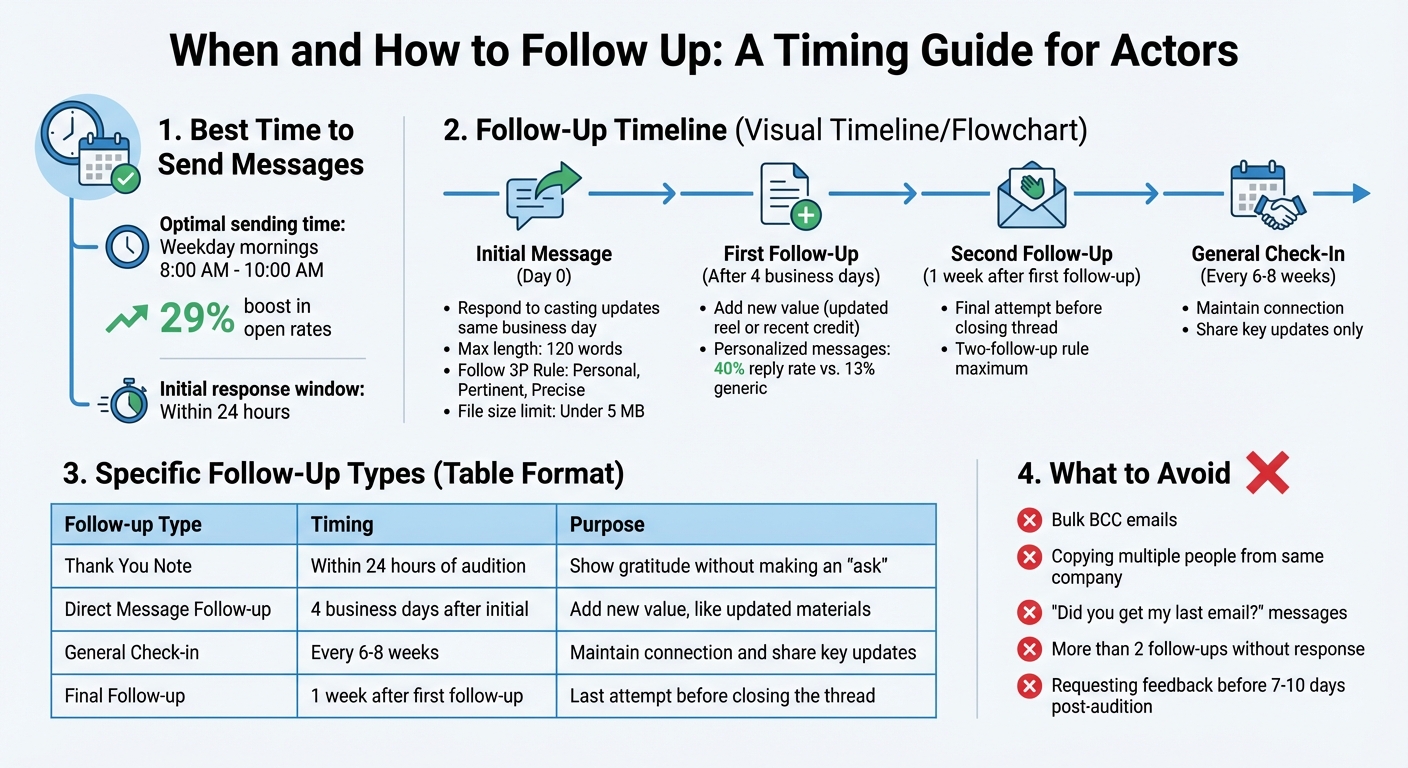
In-App Messaging Follow-Up Timeline and Best Practices for Actors
Getting your timing right is just as important as crafting the perfect message. Studies show that sending messages during weekday mornings between 8:00 AM and 10:00 AM can boost open rates by as much as 29%. This timeframe aligns with casting managers’ daily routine of checking emails, increasing the chances your message will be noticed.
For initial outreach, aim to respond within a 24-hour window. For example, if a casting director views your profile or a relevant role is posted, follow up promptly with a personalized message referencing the specific project or interaction. This demonstrates professionalism and interest without coming across as pushy.
Responding Quickly to Casting Updates
When you get an audition notification or a casting update, aim to reply on the same business day. Keep your response concise - no more than 120 words - and follow the 3P Rule: make it Personal, Pertinent, and Precise. Mention the specific role or update, and if you’re attaching materials, ensure the total file size stays under 5 MB so it’s easy to access on mobile devices.
If you need to follow up after your first message, wait 4 business days before reaching out again. Make sure to include something new, like an updated reel or a recent credit, to add value to your follow-up. If there’s still no response, wait another week for a final follow-up. After that, close the thread politely. Casting director Brette Goldstein advises keeping general check-ins to every six to eight weeks. This approach keeps you on their radar without overwhelming them.
How to Avoid Sending Too Many Messages
Striking the right balance between persistence and restraint is essential. Stick to the two-follow-up rule: if you don’t get a response after two attempts, step back and wait for a future opportunity. Personalizing your messages can make a big difference, increasing reply rates to 40%, compared to just 13% for generic pitches. Always add value in your messages - don’t send emails that simply ask, “Did you get my last email?”.
Avoid tactics like bulk BCC emails or copying multiple people from the same company, as these can lead to your profile being flagged as spam. When sending thank-you notes, keep them short and immediate, and hold off on requesting feedback until 7–10 days after an audition.
| Follow-up Type | Recommended Timing | Purpose |
|---|---|---|
| Thank You Note | Within 24 hours of audition | Show gratitude without making an "ask" |
| Direct Message Follow-up | 4 business days after initial | Add new value, like updated materials |
| General Check-in | Every 6–8 weeks | Maintain connection and share key updates |
| Final Follow-up | 1 week after first follow-up | Last attempt before closing the thread |
Conclusion
Taking lessons from earlier strategies, here's how to fine-tune your messaging approach for maximum impact.
Effective in-app messaging thrives on clarity, personalization, and timeliness. Every word should serve a purpose. Keep your copy brief and error-free, open with tailored greetings that acknowledge specific roles, and use visuals like headshots sparingly - these can increase engagement by 650%.
Personalization is key. Craft messages that align with the recipient’s role and situation. These small but meaningful adjustments can elevate your communication game.
Timeliness matters just as much. Aim to respond to casting updates within hours, not days, and schedule your messages for peak engagement times. Experiment with A/B testing to refine text, visuals, and timing, and use metrics like callback rates to continuously improve your strategy.
Tools like CastmeNow can handle repetitive tasks, giving you more time to focus on crafting impactful follow-up messages. It simplifies submissions and offers performance insights, allowing you to direct your energy where it counts.
Start refining your messaging today. Create a customized message, test your timing, and include a clear call-to-action like "Submit Reel for [Role]" to drive results. Even small tweaks can lead to noticeable improvements in your casting success.
FAQs
What should I say in my first message to a casting director?
Hello,
My name is [Your Name], and I'm excited about the opportunity to contribute to this project. I bring a passion for [specific skill or trait relevant to the role], and I believe my experience aligns well with what you're looking for.
You can view my headshot and demo reel here: [Insert Link].
Looking forward to the possibility of collaborating and bringing this vision to life!
Thank you for your time,
[Your Name]
How many follow-ups is too many?
Sending more than three follow-ups can often feel overwhelming and may lead to user fatigue or even disengagement. It's important to keep your communication brief and respectful to ensure the interaction remains positive and well-received.
How can CastmeNow help me message more effectively?
CastmeNow simplifies the way you match with roles and submit applications, allowing you to respond quickly and stay on casting directors' radar 24/7. By automating these tasks, it saves you time and boosts your visibility, giving you a better shot at landing auditions.