How Skill Matching Works in Casting Tools

I treat a casting match as a reason to review a role - not a promise of an audition. To help tools read your profile, keep your skills, credits, union status, availability, and submission limits current.
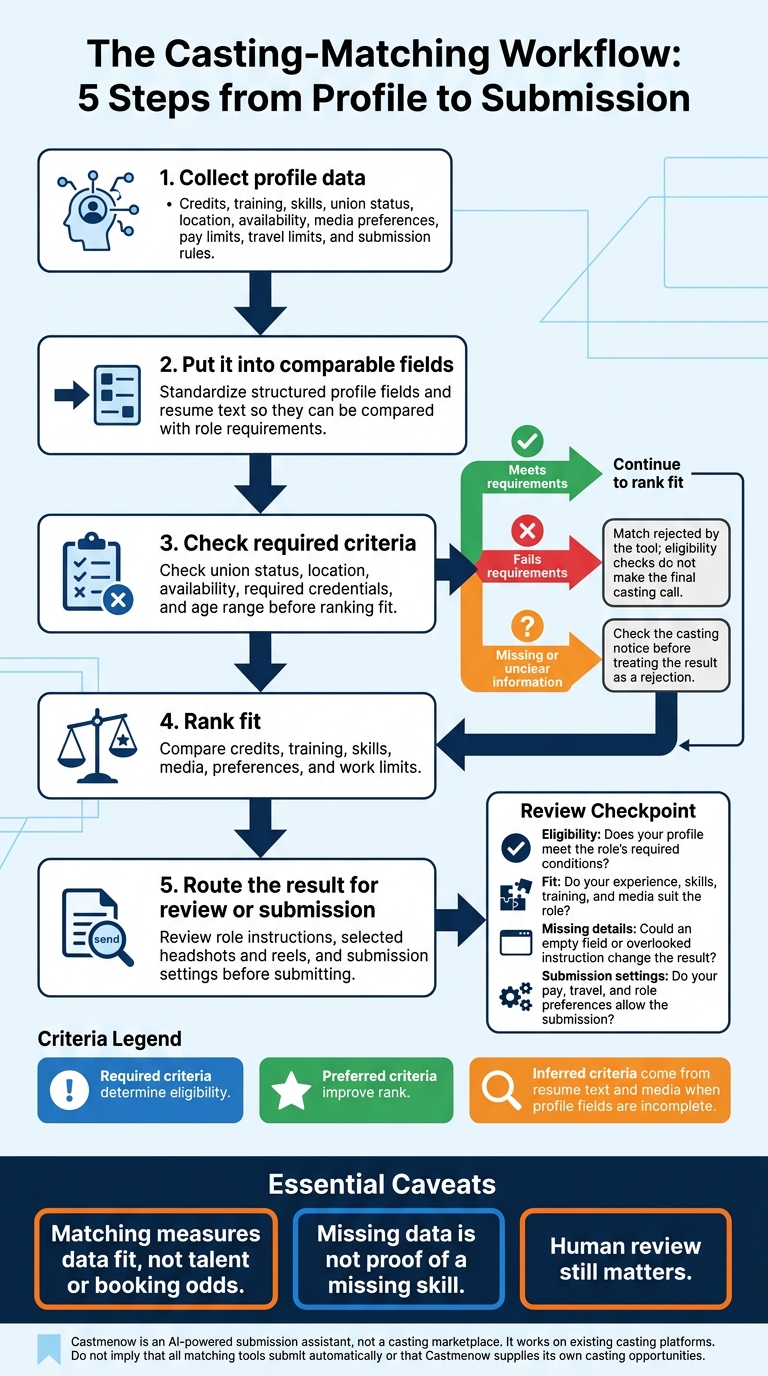
Matching follows 5 steps: collect profile data, put it into comparable fields, check required criteria, rank fit, and route the result for review or submission.
Here’s what I check before trusting a match:
- Eligibility: Does your profile meet the role’s required conditions?
- Fit: Do your experience, skills, training, and media suit the role?
- Missing details: Could an empty field or overlooked instruction change the result?
- Submission settings: Do your pay, travel, and role preferences allow the submission?
Castmenow adds a submission workflow to existing casting platforms; it isn’t a casting marketplace. I’d review its account permissions and submission history, too.
The bottom line: <u>matching measures data fit, not talent or booking odds</u>. Human review still matters.
How Skill Matching Works in Casting Tools
The Data Behind Role Matching
After standardization, the tool reads profile fields in a fixed order and compares them with role requirements to score fit. These fields help tools check eligibility, rank relevance, and route matches for review.
Credits, Training, Skills, and Media
Structured fields and resume text can provide credits, training, and special skills. Profile settings can provide media preferences. Use headshots and reels to support the credits, training, and special skills you list. This is a core part of role-specific portfolio building. Keep written claims accurate and supporting media easy to find.
These inputs shape both eligibility checks and ranking.
Union Status, Preferences, and Work Limits
Keep your union status, location, availability dates, pay limits, and submission rules up to date by optimizing your casting profile.
Required, Preferred, and Inferred Criteria
Required criteria determine eligibility. Preferred criteria improve rank. Inferred criteria come from resume text and media when profile fields are incomplete.
sbb-itb-daa9c42
How Tools Check Eligibility and Rank Matches
Check Mandatory Requirements
Once profile data is standardized, casting automation improves metrics as the tool checks hard requirements first: union status, location, availability, required credentials, and age range. It rejects matches that fail these rules. If a field is missing or a flag is unclear, check the casting notice before treating it as a rejection. Eligibility checks flag possible issues; they don’t make the final casting call.
Compare Skills, Experience, and Preferences
If the role passes the eligibility check, the tool weighs credits, training, skills, media, preferences, and work limits to rank the match. A ranking shows fit - not the chance of an audition or booking.
Review Matches Before Submission
Before submitting, check that the selected headshots and reels suit the role and the casting call. Recommendations measure data fit, not chemistry, presence, or interpretation. Those judgments stay with the casting team.
This review feeds into the workflow layer, where matches are submitted only after fit is checked.
Matching Limits and Castmenow's Workflow
Why Automated Matches Can Be Wrong
The next risk isn't scoring. It's incomplete or misread input. Missing data is not proof of a missing skill. When a match is uncertain, check the notice. Accurate, current profile data helps prevent missed opportunities and unsuitable submissions.
| Algorithmic strength | Corresponding limitation |
|---|---|
| Fast eligibility filtering | Depends on current data and correctly interpreted rules |
| Consistent skill comparisons | May miss synonyms, nuance, or transferable experience |
| Preference-based ranking | Cannot judge chemistry |
| Efficient opportunity screening | May miss proficiency or submission-rule details |
Different keywords can hide relevant experience. And listing a skill doesn't always show that an actor meets the required proficiency. Matching systems may favor familiar credits or training paths while overlooking nonstandard experience. Use recognizable skill terms, describe proficiency honestly, and review borderline matches. Rankings aren't objective measures of talent.
These limits often appear when requirements sit outside profile fields. A tool may not have access to every attachment, custom question, private note, audition instruction, or opportunity. Custom questions and self-tape notes can contain requirements that profile data alone won't address.
How Castmenow Assesses Fit and Submits
Castmenow (Cast Me Now) is an AI-powered submission assistant, not a casting marketplace. It works as a workflow layer on existing casting platforms: monitoring opportunities, checking fit against profile data and preferences, and automating your audition submissions on your behalf.
The workflow follows profile inputs → opportunity evaluation → fit assessment → submissions. Connect only the accounts you intend to use, and review permissions and the information the tool can access. Keep credits, training, special skills, union status, media preferences, location, pay requirements, travel limits, and availability current.
Set clear boundaries before allowing submissions. Then review submission history to spot and correct duplicate, late, or unsuitable applications. Speed and consistency can cut repetitive work, but accurate profile data still drives better matches. Using time-saving submission tips alongside automation ensures you remain competitive without sacrificing quality.
Conclusion: Keep Matching Data Accurate
After eligibility checks and ranking, accurate data still determines whether a match is useful. Outdated details can lead to irrelevant matches or missed opportunities. Matching improves visibility - not booking odds. You still need human review to see whether automated matches fit your goals.
Profile and Submission Checklist
Use this checklist to keep matching accurate over time:
- Check your record: Keep your profile current, including your skills, experience, union status, and media preferences.
- Check your preferences: Choose role types and submission settings that fit your casting goals.
- Check your files: Keep headshots and reels up to date so the system can select the right media.
- Check the results: Review automated matches regularly. If results drift, update your profile so matching reflects your current credits, skills, and preferences.
FAQs
How should I list skills with different proficiency levels?
List your skills accurately and honestly so you’re matched with roles you can confidently perform on camera. Skip basic abilities and focus on skills supported by certifications or proven experience.
For languages and technical skills, make your proficiency level clear with labels like “Intermediate Spanish” or “Fluent French.” Your bio can also include training in a specific technique or certifications, such as certified stage combat experience.
What should I check if a suitable role ranks low?
Review your filters and loosen any location or age limits that are too narrow. Update your bio and credits with relevant keywords and project types that match your current skills.
Keep your profile complete and active: update your headshots, add recent credits, and revise your union status when needed. Reset your preference surveys and clear your search history to remove outdated data.
How can I prevent unsuitable automated submissions?
Review your role filters regularly and keep your profile up to date. If your matches miss the mark, reset your preference surveys, clear your search history, and adjust your filters to match your skills and career goals. For more focused results, narrow broad filters by project type or add targeted keywords to your bio.
Manually skip roles that don’t fit to help the system learn your preferences. Keep your profiles in sync and consistent so submissions don’t include outdated or incorrect information.