How to Manage Casting Applications Automatically

Actors spend 20–30 hours weekly submitting applications and creating self-tapes, and 85% miss opportunities due to slow applications. CastmeNow solves this by automating your casting process. It links to your existing profiles on platforms like Casting Networks and Actors Access, matches roles based on your preferences, and submits applications 24/7. Users report tripling their audition chances and saving over 20 hours per week.
Here’s how it works:
- Sign up: Get started with a free 30-day trial - no credit card required.
- Integrate profiles: Securely link your casting accounts to enable role matching.
- Set preferences: Define criteria like pay, location, and role type for tailored submissions.
- Track progress: Use analytics to monitor applications, audition rates, and refine your strategy.
- Choose a plan: The Basic Plan ($12/month) offers up to 10 daily applications, while the Plus Plan ($28/month) provides unlimited submissions and advanced tools.
With CastmeNow, you can focus on your craft while the platform handles the repetitive work.
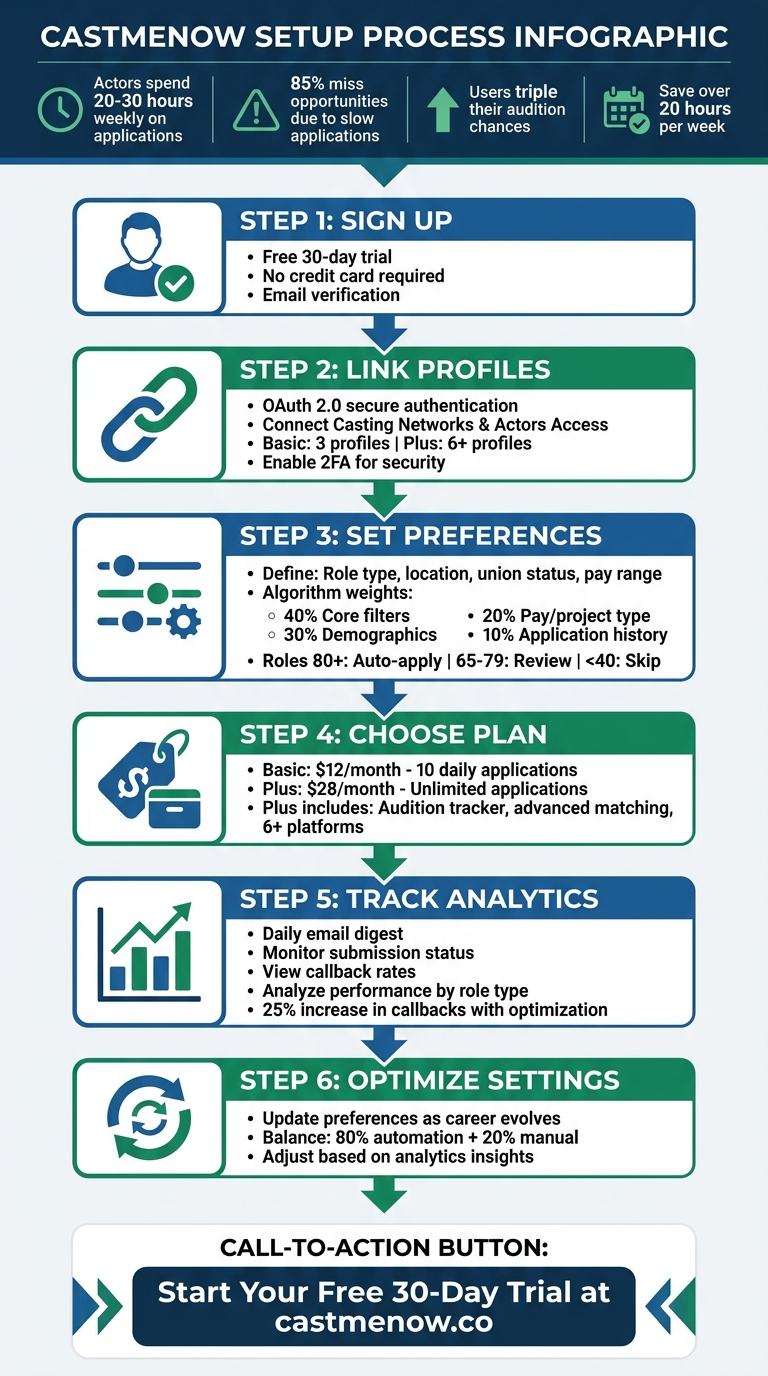
6-Step Guide to Automating Casting Applications with CastmeNow
Step 1: Setting Up Your CastmeNow Account
Creating Your Account
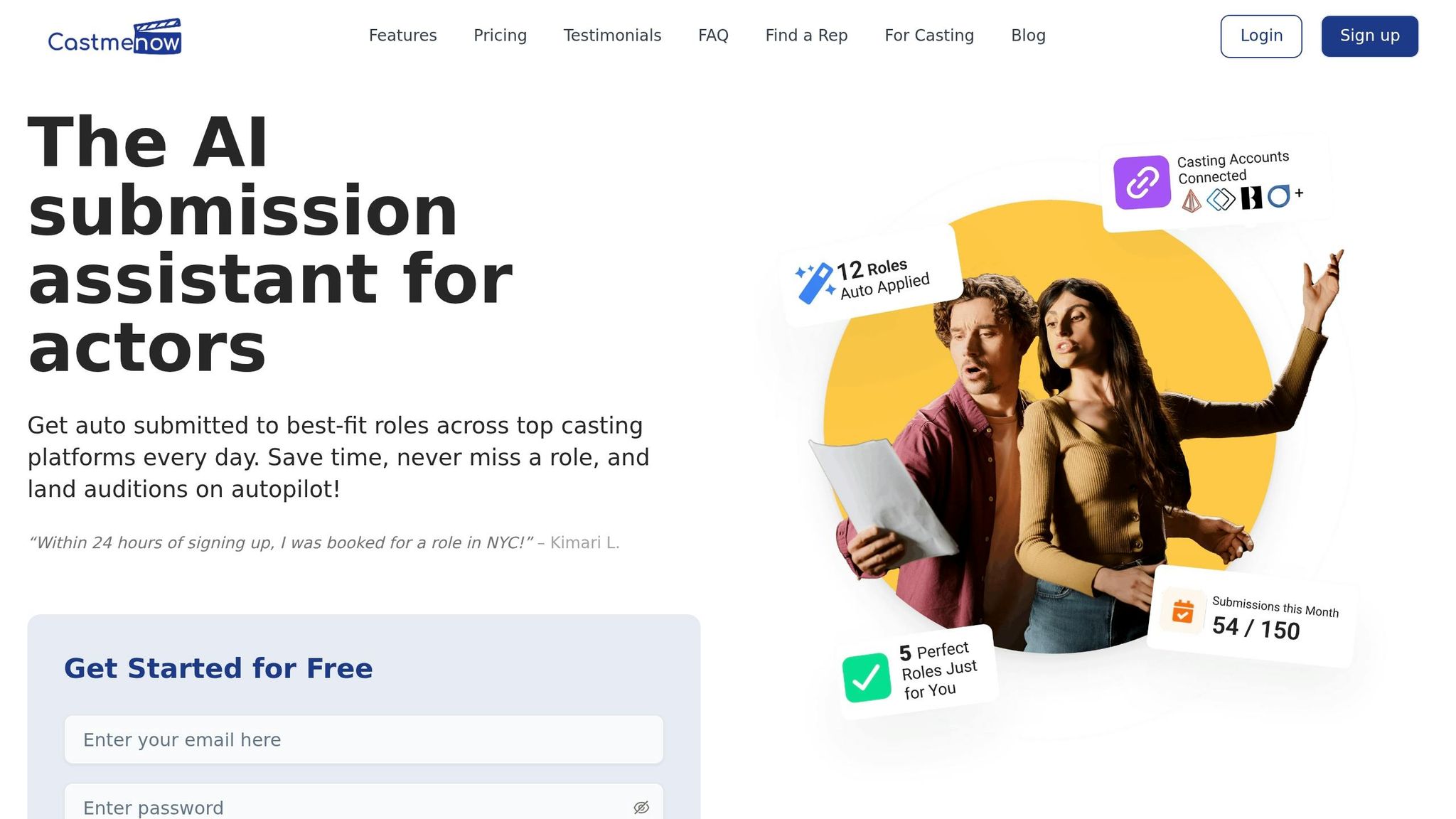
Getting started with CastmeNow is quick and simple. Visit castmenow.co and sign up using your email address - no credit card needed. You’ll get a risk-free 30-day trial with full access to all features, giving you a chance to explore everything the platform has to offer before making a decision.
After verifying your email, you’ll be asked to link your existing casting platform profiles. This step is essential for enabling role matching - without it, the automation process won’t work.
The setup process allows you to connect up to three casting platform profiles if you’re on the Basic plan, or six or more if you choose the Plus plan. During this process, you’ll also define your preferences, such as union status, minimum pay, and location. These settings ensure the AI submits you only for roles that align with your criteria from the start.
Once your account is ready and profiles are linked, you’ll gain access to the dashboard where you can monitor and manage your submissions seamlessly.
Navigating the Dashboard
After completing the signup process, you’ll be directed to the CastmeNow dashboard. This serves as your all-in-one hub, eliminating the hassle of switching between multiple casting apps.
The dashboard provides a clear overview of your application history, submission statistics, and top role matches. Plus, you’ll receive a daily email digest to keep you updated on your activity. With the automation working behind the scenes 24/7, your roles are submitted within minutes of being posted, ensuring you never miss an opportunity.
sbb-itb-daa9c42
Step 2: Linking Your Casting Platform Profiles
Why Profile Integration Is Needed
Integrating your profiles allows CastmeNow to take over the time-consuming task of streamlining your daily casting search that match your preferences. With this setup, the platform continuously scans both Casting Networks and Actors Access for new roles and submits applications automatically, saving you hours of manual work.
Without integration, you'd need to check each platform daily, search for roles, and submit applications individually - a process that can quickly become overwhelming. By linking your profiles, CastmeNow does this for you around the clock, helping you apply for more roles than you could on your own. The best part? You maintain full control of your accounts while the system handles the repetitive tasks.
Now, let’s go over how to connect your profiles securely.
How to Connect Your Profiles Securely
CastmeNow uses OAuth 2.0, a token-based authentication method, to link your casting accounts. This means your passwords are never stored by CastmeNow, ensuring a secure connection that aligns with industry security standards. It's designed to work seamlessly with the setup you completed in Step 1, providing both functionality and peace of mind.
To link your accounts:
- Log in to your CastmeNow dashboard and go to the Integrations section.
- Choose either Casting Networks or Actors Access, then follow the prompts to log in to the selected platform.
- Once logged in, authorize CastmeNow to access your profile and submit applications for you. The connection is established almost instantly.
For added security, make sure two-factor authentication (2FA) is enabled on both your Casting Networks and Actors Access accounts before linking them. After completing the integration, check your CastmeNow dashboard to confirm the status shows as "Connected" or "Active." If needed, you can revoke access anytime through the "Connected Apps" section in your casting platform's settings.
This integration ensures that your casting journey is both efficient and secure.
Step 3: Configuring Your Role Preferences
Defining Your Criteria
Once your profiles are linked, the next step is setting your role preferences in the Preferences section. This is where you can fine-tune the filters that guide the automated application process.
Here, you can specify details like role type (lead, supporting, extra), location (e.g., Los Angeles, CA within a 50-mile radius), union status (SAG-AFTRA, non-union, or both), pay range (e.g., $100–$500 per day), age range, gender, ethnicity, and project type (film, TV, commercial, theater). Additional options include role duration and whether you're open to traveling or prefer local-only roles.
These filters directly impact how the system applies to roles on your behalf. For instance, if you're just starting out, you might focus on non-union, local roles with modest pay. Meanwhile, seasoned actors might prioritize SAG-AFTRA roles with higher pay. Striking the right balance is key - criteria that are too broad may result in irrelevant applications, while overly specific filters could cause you to miss out on great opportunities. Users who maintain balanced preferences have reported a 40–50% improvement in match accuracy.
Once you’ve set up your preferences, the system continually uses them to evaluate and apply for roles that align with your goals.
How the Matching Algorithm Works
After defining your criteria, the matching algorithm takes over to streamline the application process. This algorithm is designed to evaluate roles efficiently and ensure you're matched with the most relevant opportunities.
The system scans platforms like Casting Networks and Actors Access, assigning each role a score from 0 to 100 based on how closely it aligns with your preferences. The algorithm weighs your criteria as follows:
- 40%: Core filters (role type, location, union status)
- 30%: Demographics (age and gender)
- 20%: Pay range and project type
- 10%: Application history
Roles scoring 80 or higher are automatically applied for, while those scoring between 65 and 79 trigger a notification for your review. Roles scoring below 40 are excluded entirely. For example, a role that matches your preferences in nearly every way might score over 80 and be auto-applied, while a role with minor mismatches might land in the notification zone. This scoring system has led to callback rates three times higher than those achieved through manual applications.
The dashboard also tracks key metrics like your match rate, auditions per 100 applications, and common rejection reasons. These insights allow you to tweak your preferences over time. Users who adjust their settings based on these metrics see an average 25% increase in callbacks.
Step 4: Choosing Your Plan and Application Limits
Comparing Subscription Plans
CastmeNow offers two subscription options tailored to fit the needs of actors at different stages of their careers. The Basic Plan is priced at $12/month and allows you to automatically apply to up to 10 roles daily on key casting platforms like Actors Access, Backstage, and Casting Networks. This plan works well for newcomers or those who prefer to keep their submissions manageable. On the other hand, the Plus Plan, at $28/month, gives you unlimited daily applications and advanced tools, such as personalized matching, priority submissions, and a detailed audition tracker. The tracker provides insights into which headshots or reels are driving your success.
| Feature | Basic Plan | Plus Plan |
|---|---|---|
| Monthly Price | $12 | $28 |
| Daily Application Limit | Up to 10 roles | Unlimited |
| Casting Networks | Standard networks | 6+ integrated platforms |
| Matching Type | Standard | Advanced with personalization |
| Audition Tracker | Not included | Included |
| Best For | New actors | Career-driven professionals |
| Free Trial | 30 days | 30 days |
Adjusting Application Limits
Once you've chosen your subscription, you can tweak your daily application limits to align with casting directors' expectations and avoid appearing overly automated by weighing manual vs automated casting submissions.
Even with unlimited submissions, setting a reasonable daily cap can help keep your application activity looking natural. This approach also reduces the chance of being flagged for spam. Casting professionals have noted that automated high-volume submissions often lack personalization. For example, one hiring manager reported that 90% of such applications were missing tailored details, making verifiable social signals, like a LinkedIn profile, more important than ever.
Using the CastmeNow dashboard, you can adjust your submission settings to prioritize quality. For instance, you might limit daily submissions to around 15, ensuring the system focuses on roles that closely match your preferences and profile.
Actor Ja'son Manwill shared: "It has saved me countless hours of waiting by the laptop... it works WHILE I am on set submitting me every 10 minutes to new postings."
Cast Me Now: How this AI Workflow Helps Actor Submissions
Step 5: Tracking Applications and Using Analytics
Once your automated submissions are set up, the next step is keeping tabs on your applications and using analytics to improve your chances of landing roles.
Viewing Your Application History
With CastmeNow, you’re always in the loop about your submissions without the need to check constantly. Every day, you’ll receive an email digest summarizing your top submissions from the previous day. This daily update gives you a quick snapshot of your activity.
Within the app, the Discover Tab lets you track the status of each submission - from "pending" to "complete" - as reviews progress. The Audition Tracker syncs with your profiles in real time, updating audition details and statuses automatically. This means you can monitor opportunities from platforms like Casting Networks and Actors Access all in one place, without the hassle of juggling multiple tabs.
By centralizing all this information, CastmeNow makes it easier to stay on top of your submissions while also setting the stage for deeper insights.
Analyzing Performance Metrics
Once your submission history is tracked, the platform’s analytics tools step in to help you refine your strategy.
With the Plus Plan, you gain access to detailed insights through the Audition Tracker & Insights feature. On the Stats page of your Auditions dashboard, you can break down your submissions by pay rates, role types, and project categories. This helps you identify trends, like which types of roles or projects are generating the most interest. There’s even a Top Casting Directors section that highlights industry professionals who frequently invite you to auditions.
To make things even easier, AI-powered recommendations appear on your dashboard, offering personalized tips based on your data. For instance, if short-form content roles are where you’re booking the most, the system might suggest updating your reel to showcase similar work.
Moses Jackson shared his experience: "In the past 2 weeks since having cast me now in my arsenal I have been submitted 484 times, have gotten 19 auditions (well 20 as one just came in), and booked twice".
These tools give you the power to adapt and optimize your approach, helping you focus on roles and strategies that align with your strengths and past successes.
Step 6: Adjusting Your Automation Settings Over Time
Once you've set up your automation and analyzed the initial results, it’s time to fine-tune your settings as your career develops. Your journey in the industry isn’t static, and your automation settings shouldn’t be either. Whether you’re booking more roles, receiving feedback, or shifting your goals, keeping your CastmeNow preferences updated ensures they align with your evolving needs.
Updating Your Role Preferences
Your dashboard offers a straightforward way to tweak your criteria whenever your circumstances change. Simply navigate to Settings > Preferences to adjust factors like age range, role types, or location. For instance, if you find yourself consistently booking older roles, consider broadening your age range (e.g., from 25–35 to 25–40) to reflect this trend. These changes are applied immediately.
Similarly, if you’ve gained theater experience and want to focus more on stage roles, you can add "stage roles" to your preferences. Relocating to a new city? Update your location settings to ensure you’re only seeing opportunities nearby. Analytics can also guide your adjustments - if ensemble roles are generating a 40% response rate compared to just 15% for lead roles, or if your callback rate dips below 20%, it might signal the need to shift your focus. These small but strategic updates help you make the most of automated applications while identifying when manual interventions are necessary.
Balancing Automation with Manual Applications
Automation can handle the bulk of your submissions, but prioritizing certain roles manually is key. A practical approach is to let automation manage about 80% of your applications - perfect for commercials or background roles - while reserving 20% for high-priority opportunities, like dream projects or those recommended by your agent.
Through Plan Settings, you can set daily limits for automated applications (e.g., 50 per day) and establish exclusion rules. For example, if you’re targeting union work exclusively, configure the system to skip non-union opportunities. For top-priority roles - such as SAG projects or agent-highlighted gigs - you can temporarily pause automation via Dashboard > Automation Controls > Pause All and apply manually through platforms like Actors Access.
This hybrid approach combines efficiency with a personal touch, and industry managers have noted that using this balance can boost callback rates by around 25%.
Conclusion
Casting applications don’t have to consume your entire day. CastmeNow takes care of the tedious tasks - searching, evaluating, and submitting applications across platforms like Casting Networks and Actors Access. By automating these processes, your profile stays active without constant effort, giving you more time to focus on your craft and career growth.
The platform’s algorithm ensures you're only applying to roles that align with your preferences and career goals. This targeted approach not only saves time but also increases your chances of being noticed by casting directors. When casting directors see applications from actors who truly fit their requirements, the process becomes smoother for everyone involved. Over time, maintaining a consistent presence can help you build familiarity with the professionals reviewing applications.
Analytics tools provide insights into which roles generate the most responses, helping you fine-tune your strategy. These features, combined with the flexibility to adjust your preferences as your career evolves, put you in control while benefiting from automation’s efficiency.
Whether you’re just starting out or juggling multiple opportunities, the free 30-day trial offers a risk-free way to explore everything the platform has to offer. No credit card is required, and you’ll get to see how many roles match your criteria, track your response rates, and decide if this automated approach fits your casting strategy.
Try the free 30-day trial today and turn your casting process into a streamlined, strategic advantage.
FAQs
Will CastmeNow apply without my approval?
CastmeNow streamlines the process of applying for acting roles by linking directly to your casting profiles and aligning opportunities with your specific preferences. Importantly, the platform won’t submit applications without your consent. You have the final say, with the ability to approve or tweak each submission as needed. It’s all about saving you time while ensuring you stay in control of your career decisions.
How do I stop or pause auto-submissions?
To pause or stop auto-submissions in CastmeNow, log into your account and navigate to your profile or application settings. Look for the automation or submission preferences section, where you can turn off or pause the auto-application feature. Alternatively, if the option exists, set the daily submission limit to zero. This gives you full control over your automated casting applications, allowing you to manage or pause them as needed.
Is linking my casting profiles secure?
Linking your casting profiles to platforms like CastMeNow is typically a safe process. These tools are built to securely integrate with your casting accounts. To keep your information protected, make sure to:
- Use strong, unique passwords for your accounts.
- Enable two-factor authentication whenever it's available.
- Verify that the platform uses encrypted connections (look for HTTPS in the URL).
By sticking to these precautions, you can streamline your casting applications while keeping your accounts secure.