Saved Searches on Casting Platforms: Benefits Explained

Finding the right acting roles can be overwhelming. With hundreds of new listings daily, manually searching takes hours and often leads to missed opportunities. Saved searches simplify this process by automatically filtering and notifying you about roles that match your criteria.
Key Benefits:
- Time-Saving: Set filters once (e.g., location, age range, project type) and let the system do the work.
- Instant Alerts: Get notified about new roles via email or push notifications.
- Better Matches: Focus only on roles that align with your profile and career goals.
- Round-the-Clock Monitoring: Never miss opportunities, even when you're offline.
Actors using saved searches report up to 10x more auditions and significant time savings. Combine these tools with audition submission automation like CastMeNow for even faster submissions and better results. Whether you're aiming for commercials, films, or voiceover gigs, saved searches ensure you stay ahead in the casting game.
What Are Saved Searches and How Do They Work?
Saved searches are a handy tool that remembers your filter settings - like age, location, project type, and union status - to automatically find casting notices that match your preferences. Instead of endlessly scrolling through breakdowns every day, you set your criteria once, and the platform does the heavy lifting for you.
Here’s how it works: you apply filters (e.g., filming location, audition radius, role type, demographics), hit "Save Search", and give it a name like "LA Commercials." Most platforms show your saved search results as soon as you log in and even let you set up notifications - whether instant, daily, or weekly. This creates a system that works nonstop to keep you updated.
"This feature provides talent with full control over which roles they are notified about and the frequency of the notifications. This ensures that talent are connected to the right roles in the most efficient manner." - Jamie Rihacek, Director of Product, Talent Systems
These tools are designed to make finding the right roles easier and more efficient for actors.
Main Features of Saved Searches
Once you’ve set up a saved search, several features come into play to make your job hunt smoother. The filter options are comprehensive, covering:
- Demographics: Match roles based on age range, gender, and ethnicity.
- Location: Set preferences like the filming city or audition radius to ensure roles are feasible for you.
- Project Type: Focus on specific fields like film, TV, voiceover, or commercials.
- Union Status: Filter by your professional affiliation, such as SAG-AFTRA, Equity, or non-union.
The notification system offers flexibility in how you’re alerted about new roles. You can choose instant updates for highly competitive postings or opt for daily or weekly summaries if you prefer to review opportunities in batches. Platforms like Casting Networks include these tools as part of their standard offerings, catering to actors at all stages of their careers.
Another standout feature is the ability to create multiple saved searches tailored to different parts of your career. For instance, you might have one search for local commercial gigs, another for union voiceover roles, and a third for film projects in your age range. By naming these searches clearly - like "Local Commercials" or "Union Voiceover" - you can quickly switch between them as needed, staying ready for a variety of opportunities.
Saved Searches vs. Manual Searches
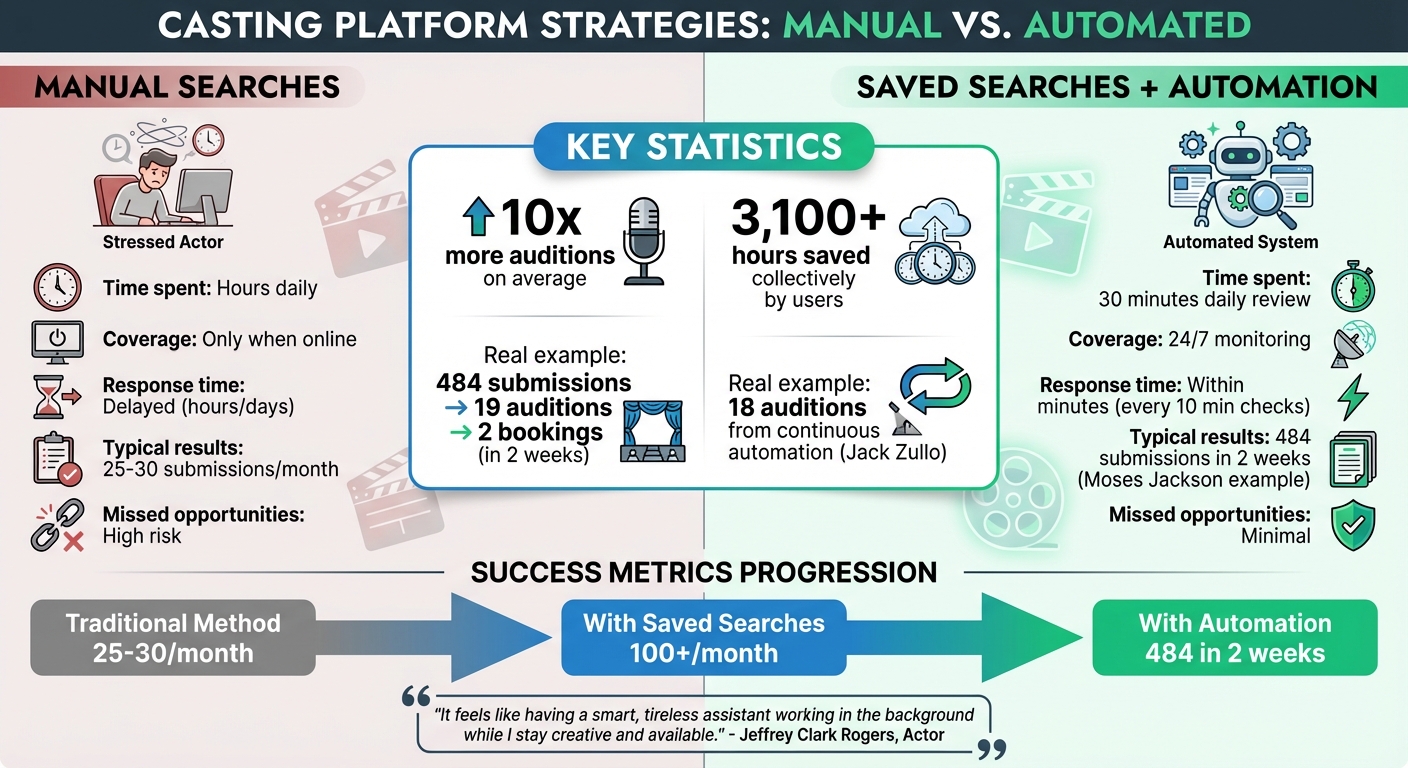
Manual searches require you to repeatedly apply filters and constantly monitor for new postings. This means you’re only seeing roles when you’re actively online, which can lead to missed opportunities - especially if they’re posted during times you’re unavailable.
Casting automation vs manual searches is a common debate, but saved searches change the game. Once you set your criteria, the system works on autopilot, running 24/7 to find matches for you. With precise filters, you get more accurate results than you would from manual browsing. Plus, instant notifications ensure you can respond quickly - sometimes even within minutes of a role being posted if paired with automation tools.
The difference in coverage is huge. While manual browsing limits you to the time you spend online, saved searches provide round-the-clock monitoring. This means you’re not at a disadvantage compared to actors in different time zones or those with more flexible schedules. Whether you’re sleeping, training, or auditioning, your saved searches keep working, ensuring you never miss a chance to shine.
Benefits of Using Saved Searches for Actors
Saved Searches vs Manual Searches: Benefits Comparison for Actors
Saved searches can transform how you approach casting. Instead of spending endless hours sifting through breakdowns, you get a customized feed of roles that match your exact criteria. This shift from manual searching to automated matching offers clear advantages, streamlining your casting process and boosting your career.
Faster Role Discovery
With instant notifications, you can be one of the first to apply for a role - sometimes within minutes. Platforms like Backstage and Casting Networks send email or push alerts as soon as a suitable opportunity appears. This is crucial because casting directors often review only the first 10–15 submissions before scheduling auditions.
By setting a saved search as your "Casting Billboard default", relevant roles appear automatically every time you log in, saving you from constantly reapplying filters. For example, in October 2025, actor Jack Zullo landed a "Day Player" role in a SAG MLB film thanks to saved search automation. Zullo admitted he likely wouldn’t have discovered the role manually, but the algorithm identified it as a match. Actors using this tool report receiving 10 times more auditions on average.
Time Savings and Less Manual Work
The time saved adds up fast. CastMeNow users, for instance, have collectively saved over 3,100 hours. Saved searches work around the clock, so you don’t have to constantly log in and check for updates.
"It has saved me countless hours of waiting by the laptop/mobile device waiting for updates on casting sites and also it works WHILE I am on set submitting me every 10 minutes to new postings."
- Ja'son Manwill, Actor
In November 2025, actor Moses Jackson used automated submissions for just two weeks, resulting in 484 submissions, 19 auditions, and 2 bookings. By automating the busywork, you gain more time for what matters - acting classes, networking, and honing your craft. This efficiency ensures that every submission is meaningful and aligned with your goals.
Better Role Matching and Career Fit
Saved searches are all about precision. By setting filters like union status, project type, location, and demographics, you only see roles that truly align with your career path. This eliminates wasted time on mismatched opportunities.
Actors who use saved search automation often see a significant increase in both submissions and bookings. For instance, going from 25–30 submissions a month to hundreds in less than 30 days can lead to multiple featured roles and self-tape requests.
"It feels like having a smart, tireless assistant working in the background while I stay creative and available."
- Jeffrey Clark Rogers, Actor
This targeted approach helps you build a consistent portfolio in your niche instead of scattering applications across roles that don’t align with your long-term goals. Many users describe these tools as offering "peace of mind" through constant monitoring and the ability to book roles they might have missed otherwise.
How to Set Up and Optimize Saved Searches
Getting the most out of saved searches starts with setting up your filters thoughtfully. Begin with the basics: age range, gender, ethnicity, and location - whether that's where you're filming or holding auditions. Then, refine your search with professional filters like union status (SAG-AFTRA, Non-Union, or Equity Eligible) and specific project types such as Film, TV, Commercial, Voiceover, or Theater.
Selecting the Right Search Filters
Striking the right balance with filters is key. Filters that are too narrow can limit your opportunities, while overly broad ones can flood you with irrelevant listings. Start with a wide net and tighten it as you see what results come in. For role-specific filters, think about details like role type (Lead, Supporting, Background), your minimum pay requirements, and character types that align with your strengths. You can also use advanced filters for things like language skills, special abilities (such as accents or stage combat), or production size - helping you zero in on anything from student films to big-budget projects.
Naming your searches clearly is another time-saver. Labels like "Local Commercial - Non-Union" or "VO - National" make it easier to switch between them quickly. If you're using a platform like Casting Networks, set your most-used search as the "Casting Billboard default" so relevant roles show up as soon as you log in.
Once your filters are dialed in, taking time to regularly review and organize your saved searches ensures they keep delivering roles that fit your needs.
Managing and Organizing Your Saved Searches
Optimizing your casting profile is just as important as fine-tuning your filters. Regularly refresh your headshots, resume, and demo reels to make sure you're matched with the right roles.
On some platforms, saved searches can't be edited directly. If that's the case, apply your updated filters and save them as a new search to keep things current.
Set aside 30 minutes each morning to review automated matches. This small daily habit ensures you catch time-sensitive opportunities and stay ahead of the competition.
Common Mistakes to Avoid
Efficient filter management makes the difference between a smooth process and missed chances. One of the most common pitfalls? Not setting your notifications to "instant." Many casting directors only look at the first 10–15 submissions they receive, so responding late could mean missing out. Jamie Rihacek, Director of Product at Talent Systems, highlights the importance of this feature:
"Saved Search Notifications was a high-priority feature because it provides a huge benefit to the entire Casting Networks ecosystem... This ensures that talent are connected to the right roles in the most efficient manner".
Another mistake is skipping the "default" setting. Without designating a primary saved search, you'll have to reapply filters manually every time you log in, which defeats the purpose of automation. Lastly, resist the urge to overload your searches with overly specific filters from the start. Begin broad, then refine based on what works best.
Saved Searches and Automation Tools: A Perfect Pair
Saved searches are great for narrowing down roles, but they still require you to take action manually. That’s where automation tools like CastMeNow come in, bridging the gap by turning filtered results into ongoing, automatic submissions. Together, they simplify and speed up the application process.
How Automation Enhances Saved Searches
Think of automation as the next step for saved searches. Instead of just identifying roles, you can compare manual vs automated casting submissions to see how tools like CastMeNow actively submit applications for you as soon as a matching opportunity pops up. This means no more logging in repeatedly or manually applying - CastMeNow checks and submits every 10 minutes.
Take this as an example: one actor landed 18 auditions using continuous automated submissions. CastMeNow doesn’t just submit your application - it pairs it with your most relevant media and adds personalized notes, maximizing your chances.
CastMeNow's Role in Simplifying Applications
CastMeNow takes automation a step further by syncing with your casting profiles on platforms like Casting Networks and Actors Access. Using your saved search criteria, it applies AI to match you with roles across multiple casting sites, ensuring consistent and accurate results.
The impact? Users report getting 10x more auditions through automated submissions. In November 2025, actor Moses Jackson used CastMeNow for just two weeks and achieved 484 submissions, 19 audition requests, and 2 bookings - all without spending hours on manual submissions. This freed up his time to focus on preparing for those auditions.
Here’s what CastMeNow offers:
- Basic Plan: $12/month for 120 submissions across 2 casting platforms.
- Plus Plan: $28/month for 280 submissions across 6+ platforms, plus an audition tracker.
Both plans come with a 30-day free trial - no credit card needed. Set your preferences once, and the system handles the rest, leaving you free to concentrate on perfecting your craft.
Conclusion
Saved searches can save you hours of effort by streamlining the process of finding roles that fit your profile. Instead of spending time scrolling through endless listings every day, you set your preferences once, and the platform does the heavy lifting for you. This means more time to focus on what really matters - preparing for auditions and refining your craft.
When combined with automation, saved searches become even more effective. Platforms like CastMeNow take your saved search criteria and turn them into automatic, continuous submissions. You can also customize how often you receive updates, whether it’s through daily or weekly digests, helping you avoid being overwhelmed by constant notifications. This combination ensures you're not just finding opportunities but actively acting on them.
The results speak for themselves. Actors using CastMeNow report landing 10x more auditions on average. That kind of speed and consistency is tough to replicate without these tools.
Set up your saved searches today. Pair them with automation to maximize your visibility. And if you’re curious, take advantage of CastMeNow’s 30-day free trial - it’s completely risk-free, with no credit card required.
FAQs
How can saved searches make the audition process easier for actors?
Saved searches make the audition process easier by letting actors set filters like location, role type, or union status to find opportunities that align with their needs. Instead of scrolling endlessly through casting platforms, actors can depend on these automated tools to save time and stay on top of things.
By using saved searches, actors get notified about new roles that match their criteria, allowing them to act fast and not miss out on chances. This approach keeps things organized and ensures actors can focus on roles that truly matter, making the entire audition process smoother and more manageable.
How can I set up a saved search to find the best casting opportunities?
To create a saved search that keeps you updated on the best casting opportunities, start by making sure your profile is fully updated. This means uploading current headshots, resumes, and demo reels - everything casting directors need to see.
Next, set up your search by choosing filters that align with your preferences. These might include role type, location, union status, pay range, and project type. Once you've adjusted the filters to match what you're looking for, save the search with a clear name. Don’t forget to set your notification preferences, like email alerts, so you’ll know right away when new roles become available.
Finally, double-check and activate your saved search to ensure everything is working as it should. This streamlined approach helps you stay organized and focused, making it easier to spot the roles that are perfect for you.
How do saved searches help me find roles that align with my career goals?
Saved searches are an excellent way for actors to simplify the casting process. By creating filters tailored to your preferences - like role type, location, or specific project details - you can make sure you’re only alerted about opportunities that match your career goals.
This feature not only saves you time but also reduces the hassle of manually searching for roles. It keeps you focused on what truly matters: landing the opportunities that help you move forward in your acting journey.