Best Free Tools for Audition Submissions

Acting is expensive, but submitting for roles doesn't have to be. You can find, apply, and prepare for auditions without spending money by using free tools. These tools save time on acting applications and money, helping actors focus on their craft rather than admin work. From casting platforms to file-sharing apps, here's how you can build a cost-free audition workflow:
- Casting Platforms: Sites like GetActress and Actors Access offer free accounts to browse and apply for roles.
- Automation Tools: Services like Cast Me Now automate your acting audition submissions, saving hours of manual work.
- Self-Tape Apps: Tools like GhostCue (teleprompter) and Slatable (editing) simplify recording and editing.
- File Sharing: Use free tools like InstDrop or OneShare to send large video files securely.
For actors, time is everything. Tools like Cast Me Now even offer a free 30-day trial to streamline submissions. By combining these resources, you can handle auditions efficiently without spending a dime.
Four Ways to Find Auditions Without an Agent | How to Find Auditions Online (some for free)
sbb-itb-daa9c42
Main Types of Free Audition Submission Tools
Free tools for audition submissions generally fall into four categories, each addressing a specific part of the process. Knowing what each type offers can help you create a cost-effective workflow that gets the job done without breaking the bank.
Casting Platforms for Finding Roles
These platforms are where you’ll find audition opportunities. Many offer free accounts, allowing actors to browse listings and apply directly without paying for a subscription. For instance, GetActress lets users create profiles and apply for roles at no cost. Similarly, Altai Casting provides a free "Lite" tier alongside paid options. While free versions may limit submissions or the number of roles you can access, they’re a great starting point for actors just breaking into the industry.
Automation Tools for Casting Submissions
Choosing between casting automation vs manual applications is a common dilemma, as navigating multiple platforms can quickly become overwhelming. This is where automation tools step in. For example, Cast Me Now connects to major casting profiles and automatically applies to roles around the clock. It even offers a free 30-day trial (no credit card required), so you can try out its full range of features before deciding if it’s worth investing in.
"With Cast Me Now we help actors auto-apply to hundreds of acting jobs every single day. We save them hundreds of hours and get them a lot more auditions without lifting a single finger." - Shreyans, Founder, Cast Me Now
Apps for Recording and Editing Self-Tapes
Once you’ve secured an audition, recording a self-tape becomes your next priority. Fortunately, several free apps make this process easier without requiring pricey equipment or software. For example:
- GhostCue: A browser-based teleprompter that works without installation or an account.
- Slatable: Offers a free tier with specialized editing tools for self-tapes. However, exported videos include a watermark.
- Act-On-Cue: Provides a basic AI reader and recording feature, available for free to get you started.
These tools simplify self-tape creation, but you’ll also need a reliable way to share and organize the final files.
Free Tools for Sharing and Organizing Files
After recording, the next step is delivering your self-tape to casting directors. Large video files can be tricky to send, especially when free file-sharing services impose storage limits or use expiring links. Look for tools that offer permanent links and enough storage to ensure your files reach their destination smoothly. A dependable file-sharing solution is key to keeping your audition process hassle-free.
Cast Me Now: Hands-Free Audition Submissions
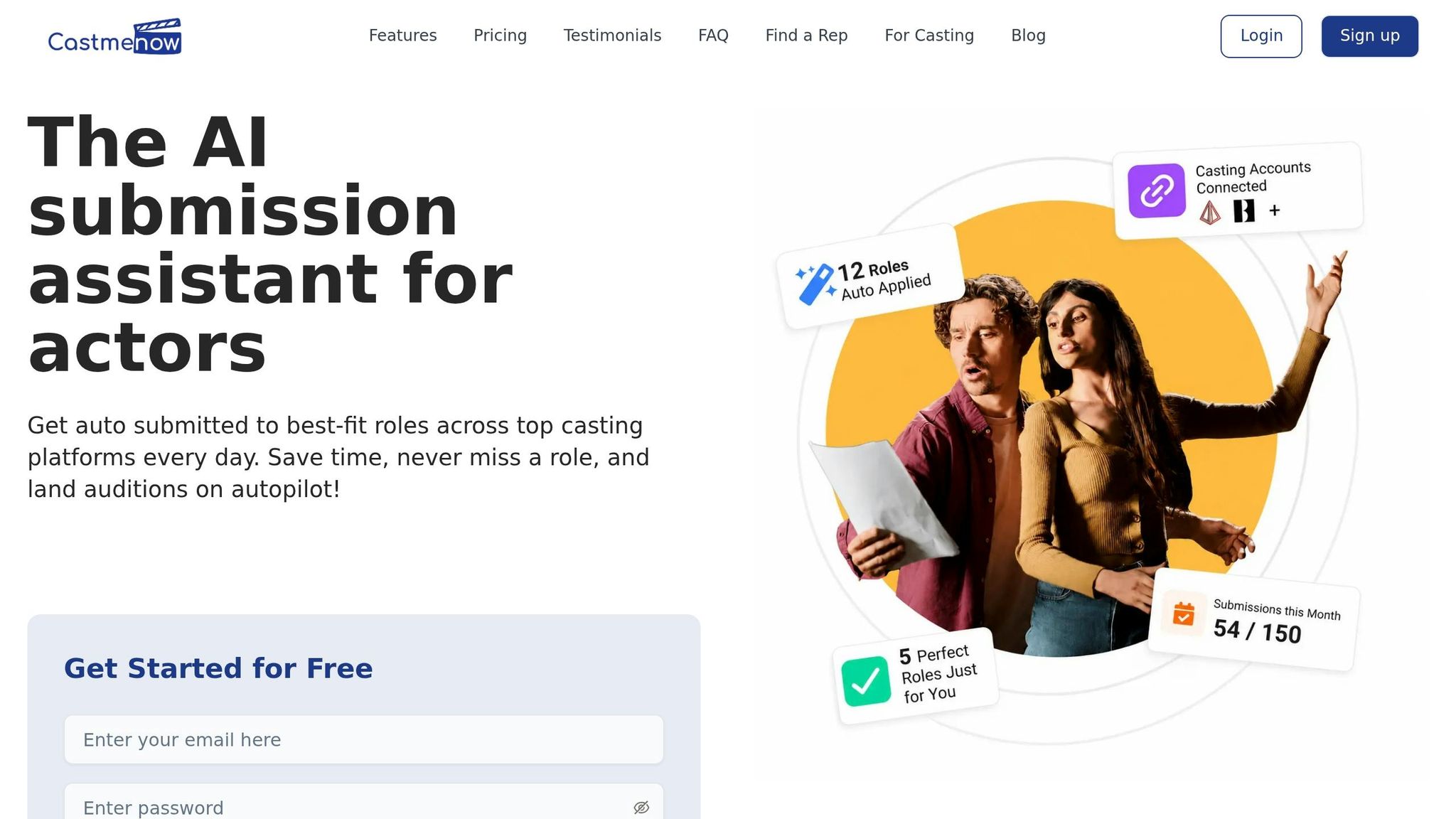
Actors often spend countless hours each week logging into casting platforms and manually applying for roles. Cast Me Now simplifies this process entirely by automating submissions for you. Acting as a layer on top of your existing casting profiles, it works continuously, so you can focus on what matters most - your craft. Let’s dive into how it connects with your current profiles.
How Cast Me Now Works
Once you link your Casting Networks and Actors Access profiles, Cast Me Now gets to work. It scans for roles that match your preferences, which you can customize with filters like location, minimum pay (e.g., $200), role type (supporting or principal), and union status. When a role fits your criteria, it automatically submits your headshot and resume.
Founder Shreyans sums it up perfectly: "The next step for you is really just to get a self-tape email in your inbox." Everything before that point is handled for you.
Actor and podcast host Haeleigh Royal saw this in action in July 2025. While juggling other business tasks, Cast Me Now submitted her profile for a "swimmer" role - something she'd been eager to land for years. She didn’t have to lift a finger:
"I was in a place where I felt really comfortable just saying take my profiles, submit how you will and we can tweak things from there... that process still was taken out of my hands and improved." - Haeleigh Royal, Actor and Podcast Host
What the Free 30-Day Trial Includes
The free trial offers a full month of access to all Cast Me Now features - no credit card required. During this time, you’ll benefit from automated role submissions, smart role matching based on your preferences, and tools to track your submission activity. The trial mirrors the Plus Plan, which includes unlimited daily applications and over 25 automation and analytics tools. It’s designed to save you the hours you’d otherwise spend manually applying.
To make the most of your trial, it’s helpful to plan ahead. Here’s how you can maximize your results.
Tips for Getting the Most Out of Cast Me Now
Before starting your trial, make sure you optimize your casting profiles on Casting Networks and Actors Access. Since Cast Me Now pulls your headshots, resume, and media directly from these profiles, outdated information could lead to irrelevant or less effective submissions. Take the time to polish your materials and define clear role preferences.
Once that’s done, shift your attention to your email inbox. That’s where self-tape requests and callbacks will arrive. With Cast Me Now handling submissions, your role is simple - be ready to respond when opportunities come your way.
Free Casting and Submission Platforms
Creating a strong casting profile is key to streamlining your audition submissions. Thankfully, several platforms offer free accounts that allow actors to connect with casting directors without needing a paid subscription.
Actors Access Free Account: What You Get
Actors Access is a go-to platform for film and TV submissions. Its free Starter account lets you create a professional profile, including your résumé, size card, special skills, and union affiliations. You also get two free headshot slots and one SlateShot upload, giving you enough space to showcase your talents without spending a cent.
What sets this free tier apart is its full submission access. You can submit your name and résumé to all breakdowns on the platform and set up "Role Match" notifications to receive alerts for roles that suit your type. Additionally, you get full access to Eco Cast, which allows casting directors to invite you to submit self-tapes or participate in live auditions directly through the platform, all at no extra cost. This setup simplifies submission management and works seamlessly with tools like Cast Me Now.
"Your Actors Access profile is the industry standard for professional Actors. Free to create and maintain, this is what Casting sees when viewing submissions from Talent Representatives or directly from you." - Actors Access
Keep in mind that adding extra media costs $10 per photo and $20 per minute of video. To make the most of your free profile, keep it concise and only update headshots when your look changes significantly.
Casting Frontier and Online Auditions
Casting Frontier is another platform offering a free Basic account. This tier includes one headshot and an online résumé, making it particularly useful for commercial and regional work - ideal for actors outside major hubs like New York or Los Angeles.
The free account also includes tools for recording and uploading up to five self-tape clips directly through the platform. While submissions are more limited compared to paid options, this account still provides visibility to casting directors and agents.
"The Casting Frontier platform has allowed me to present my youth acting work in a very professional manner to prominent casting directors... and now that virtual auditions and callbacks are an option via the BlueJeans app, using the Casting Frontier website for casting submissions has never been easier." - Mateo Ray, Actor
Other Free Casting Platforms Worth Knowing
Several newer platforms are challenging traditional submission fees with innovative, free solutions.
CastFreely, currently in early access, is entirely free for actors earning income from productions. It offers unlimited submissions, professional profiles with demo reels, AI-powered career tools, and fraud detection to ensure safe job postings.
"Actors are the only workers in America who pay to apply for jobs. We're fixing that." - CastFreely
Casting Callback provides free, unlimited audition access with a strong focus on employer verification and safety. The platform ensures that every casting notice is carefully reviewed.
"I love their ethos, that actors shouldn't have to pay to access job opportunities. Hear hear!" - Emily Outred, Actor, Casting Callback
Here’s a quick comparison of these platforms:
| Platform | Headshot Slots | Submission Capability | Additional Tools |
|---|---|---|---|
| Actors Access | 2 headshots, 1 SlateShot | Submit to all breakdowns; Role Match notifications; Eco Cast access | Self-tape & live audition invites |
| Casting Frontier | 1 headshot | Limited submissions | Up to 5 self-tape clips |
| CastFreely | Professional profile with demo reel | Unlimited submissions | AI career tools; fraud detection |
| Casting Callback | Free actor profile | Unlimited audition access | Verified, quality-checked casting notices |
The best platform for you depends on the type of projects you’re pursuing. Actors Access is a must for film and TV, while Casting Frontier is great for commercials and regional gigs. Meanwhile, platforms like CastFreely and Casting Callback are opening doors to a more accessible casting process.
Once your profiles are set up, focus on refining your self-tape recording and editing skills to make the most of these opportunities.
Free Tools for Self-Taping and Editing
Once your casting profiles are ready, it's time to ensure your audition footage looks polished and professional. The good news? You don’t need pricey equipment or software to get the job done.
Apps for Recording Self-Tapes
One of the biggest hurdles in self-taping is not having a scene partner to read lines with. That’s where Linus comes in. This app features an AI scene partner that reads cues whenever you need. Plus, it allows for hands-free recording using simple voice commands like, “Hey Linus, record.” The free version supports scenes up to one page with a maximum of 10 lines.
"Total lifesaver for self-tapes - no stress finding a reader, works anywhere." - Al Zhu
For actors who need a teleprompter while recording, Capme and Screen Script are excellent browser-based options. They combine recording, teleprompter functionality, and basic trimming into one tool. Since everything is processed locally on your device, your footage stays private and secure.
Once your performance is recorded, the next step is editing.
Free Video Editing Software
If you’re new to video editing, OpenShot is a great place to start. Its user-friendly interface and tools like Trim & Slice make it easy to cut out unnecessary footage. The built-in Title Editor is perfect for adding a name slate, a small detail that can leave a solid impression. The latest version, 3.5.1, even includes an "Optimize Preview" feature, which ensures smooth editing on older computers.
For those needing more advanced features, Shotcut is a powerful option. It supports 4K video, handles numerous file formats natively through FFmpeg, and doesn’t require file conversion before editing. If you’re looking for a browser-based editor, OpenReel Video offers multi-track editing, color grading, and noise reduction - all without installation or watermarks. Best of all, your footage remains on your device since it’s entirely client-side.
Once your video is polished, it’s time to send it off.
Sending Large Video Files for Free
High-definition self-tapes can result in hefty file sizes, making email attachments impractical. InstDrop is a peer-to-peer (P2P) tool that transfers files up to 4 GB (single file) or 8 GB (folders) without compression or the need for an account. This ensures the casting director sees exactly what you recorded.
If you prefer sharing via links, OneShare allows file uploads up to 2 GB as a guest or 5 GB with a free account. You can even add password protection for added security.
| Tool | Max Free Size | Account Required? | Key Benefit |
|---|---|---|---|
| InstDrop | 4 GB / 8 GB (folder) | No | P2P, no compression |
| DropSilk | Unlimited | No | Open-source P2P |
| OneShare | 2 GB (guest) / 5 GB (member) | Optional | Password protection |
| SendUp | 1 GB | No | Temporary links, 24-hr expiry |
Keep in mind that P2P tools like AnyDrop require both you and the recipient to have the browser tab open simultaneously, as no files are stored on a server. For situations where the casting director might download the file later, link-based services like OneShare or SendUp are more convenient. These tools can help you streamline your audition process without spending a dime.
Building a Full Audition Workflow Using Free Tools
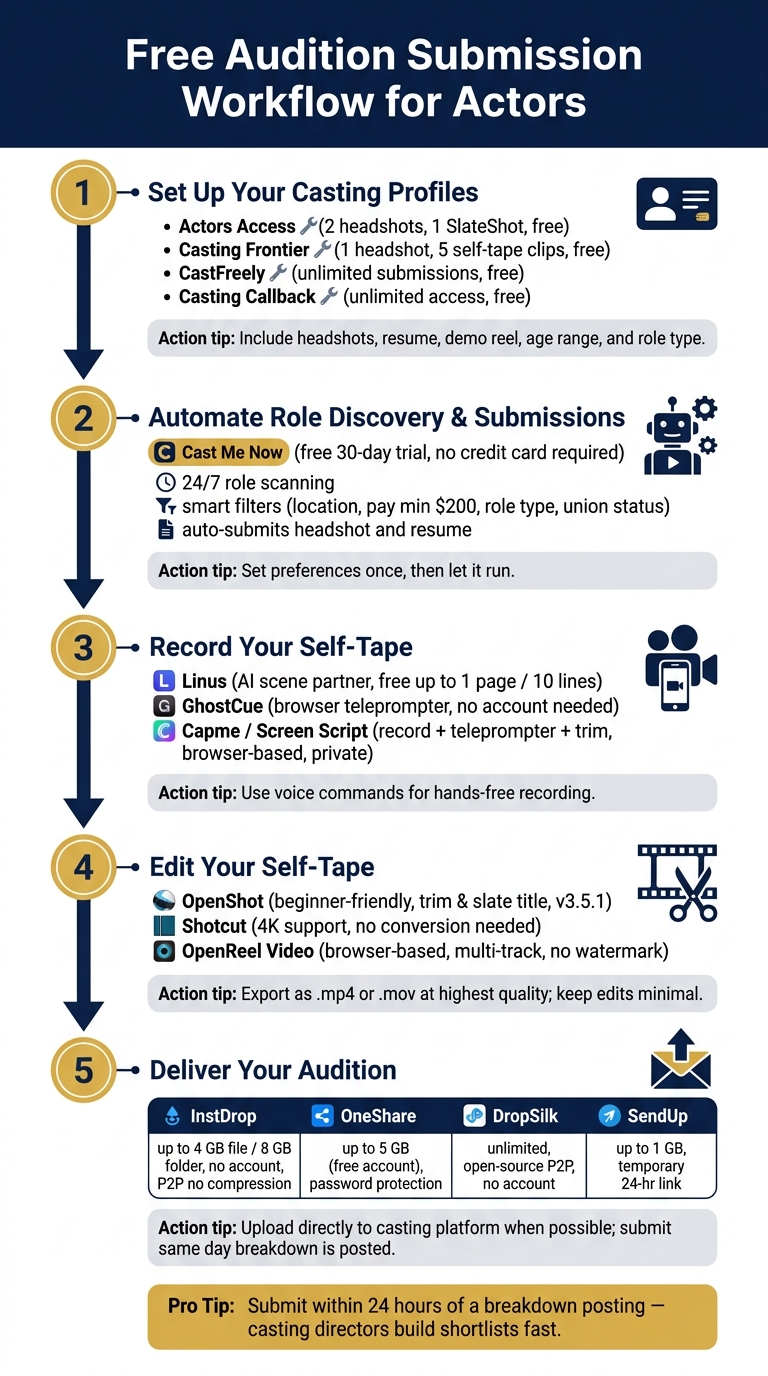
Free Audition Submission Workflow for Actors
Here's how to combine the free tools mentioned earlier into a streamlined audition process.
Setting Up Role Discovery and Submissions
Start by fully completing your casting profiles on platforms like Actors Access and optimizing Casting Networks for role matching. Include your headshots, resume, demo reel, and role-specific portfolio criteria such as age range and type. A thorough profile improves your chances of matching with the right roles.
To save time, consider using automation tools. For instance, Cast Me Now connects to your casting profiles, monitors for new opportunities 24/7, and applies on your behalf based on your preferences. This eliminates the need for daily logins.
A few simple habits can also make a difference. Keep a general cover letter template handy for common role types, but remember to tweak it for each individual submission. When submitting, rename your files in a clear format like FirstName_LastName_RoleName.mp4 - this makes it easier for casting directors to identify your submission.
With your role discovery and submissions sorted, you can shift your attention to creating a professional self-tape.
Recording and Editing Your Self-Tape
When you find a role you want to pursue, make sure your self-tape setup is ready to go. Use a reliable recording app to capture your performance, then edit lightly using tools like OpenShot or Shotcut. Keep edits minimal - your performance should take center stage.
Before exporting your self-tape, confirm that the file format is compatible with casting platforms. Most accept .mp4 and .mov without any issues. Export at the highest quality possible while keeping file size manageable for uploading.
Once your self-tape looks polished, it's time to focus on delivering it effectively.
Delivering Your Audition Without Issues
Avoid sending large HD files as email attachments. Instead, upload your audition directly to the casting platform. This ensures the file is received as intended and avoids potential compatibility issues.
Use the file management tools discussed earlier to keep everything organized. Track your submissions and archive old notifications within your platform dashboard to stay on top of your applications.
Conclusion: Getting More Out of Your Auditions for Free
You don’t need to spend a fortune to create a professional audition workflow. With the right free tools, you can handle everything - from setting up your profile to automating submissions.
Timing plays a huge role in maximizing your chances. A simple habit that can make a big difference? Submit your application the same day a breakdown is posted. Casting directors often build their shortlist within the first 24 hours, so being quick is just as critical as the submission itself.
Make your process even smoother with Cast Me Now's free 30-day trial - no credit card required. This tool works around the clock, automatically applying to roles that match your profile, so you never miss an opportunity.
Actors who see the best results with free tools are those who take the time to prepare properly. By setting up your profiles, preferences, and materials the right way from the start, you’ll be ready to let these tools do the heavy lifting. Simplify your workflow and let free resources help you stand out.
FAQs
Which free tools cover the whole audition process?
Several platforms make managing auditions easier for actors, and the best part? They’re free. CastFreely provides tools for building professional profiles, discovering roles, scheduling auditions, and even managing contracts. Then there’s Castapp, which brings everything - from submitting applications to sending final invitations - into one browser-based system. Lastly, GetActress acts as a marketplace where actors can create portfolios, browse available roles, and handle applications seamlessly. These platforms take the hassle out of submissions, scheduling, and communication - all without costing a dime.
How do I set up CastmeNow to auto-apply for me?
To set up auto-apply on CastmeNow, head to the Connect Platforms section in your settings. Link your casting platform accounts, such as Casting Networks and Actors Access, by entering your login credentials and confirming the connections. Once linked, customize your preferences by setting filters like age range, location, union status, and pay rate. You can test the setup with a sample role to make sure everything is working as expected. When you're ready, activate the auto-submission feature to enable round-the-clock applications.
What’s the best free way to send a large self-tape file?
For handling large self-tape files, tools like SendBig let you transfer up to 30GB for free, while SendGB allows 5GB without needing to register. When uploading to platforms like Actors Access, keep your files under 500MB to ensure smooth processing. If your file exceeds this size, compress it to avoid potential upload issues. Platforms like CastmeNow can simplify the process by automating submissions, making sure your media is ready without extra hassle.