Ultimate Guide to Casting Email Templates

Reaching out to casting directors is a key part of an actor's career, but it can be challenging to craft emails that are professional, concise, and effective. Casting email templates simplify this process, ensuring you include all essential details while saving time. Here's what you need to know:
- Why templates matter: They help you stay organized, professional, and consistent in your communication.
- Who benefits: Actors at all stages - from newcomers making introductions to experienced professionals sharing updates.
- Key elements of an email: A strong subject line, concise body with bolded key details, and clickable links to your reel, résumé, and profiles.
- Types of templates: Introductory emails, role submissions, and follow-ups.
- Best practices: Avoid vague subject lines, keep emails under 300 words, and send them mid-week for better visibility.
Using tools like CastmeNow can automate submissions, but personalized email templates remain essential for building connections with casting teams. Start by organizing three templates - introductions, submissions, and follow-ups - and refine them as your career evolves.
Use THESE APPS to Email A Talent Agent or Casting Director!
sbb-itb-daa9c42
Key Components of Effective Casting Email Templates
When reaching out to casting directors, every part of your email should serve a clear purpose. Casting professionals receive numerous emails daily, so yours needs to stand out while being concise and purposeful.
Writing Subject Lines That Get Opened
The subject line is your first chance to make an impression. It should be direct and informative. For role submissions, something like "Submission for the role of [CHARACTER NAME] ([Your Name])" works well - it tells the recipient exactly what to expect. If you were referred by someone, mention it upfront: "Referred by [Name of Mutual Contact]". This immediately builds credibility.
A well-crafted subject line can significantly improve the chances of your email being opened. Avoid vague phrases like "Update from [Name]" or anything resembling a mass email. Instead, focus on clarity and relevance.
"A strong subject line grabs attention without being gimmicky. Mention a referral, a shared event, or a project you're excited about." - Anne Alexander-Sieder, Author, ACT BOLD
Here are some examples for different scenarios:
| Subject Line Type | Example Format |
|---|---|
| Role Submission | Submission for the role of [ROLE] ([Your Name]) |
| Referral | Referred by [Name] |
| Networking Follow-Up | Following up from [Workshop Name] – Great to meet you! |
| Career Update | Quick Update: [Actor Name] just wrapped [Project Name] |
One tip: avoid sending emails on Monday mornings. Mid-week, especially Wednesday, tends to yield better visibility.
How to Structure the Email Body
Start with a personal greeting - "Hi Sarah" feels much more engaging than a generic "Dear Casting Director". Then, get straight to the point: introduce yourself, explain why you're reaching out, and clarify what action you’d like them to take.
"Casting directors want to know who you are - they need actors like you to bring their projects to life. So make it easy for them to see your potential." - Anne Alexander-Sieder, Actor and Coach
Highlight key details like your location, a notable credit, or a unique skill - bold these points to make them easy to spot. End with a specific call to action, such as "I'd love for you to consider me for [Project Name]." Adding a personal P.S. can also create a friendly, memorable touch.
"The P.S. is one of the most-read parts of an email, so make it count. Add a personal touch or teaser." - Anne Alexander-Sieder, Actor and Coach
Once your email is structured, ensure all supporting materials are easy to access.
Attachments, Links, and Email Signatures
Avoid sending large attachments, as they might trigger spam filters or go unopened. Instead, include clickable links to your reel, website, and casting profiles. Place these links near the top of your email for maximum visibility.
"Avoid sending large attachments - many casting directors won't open them, and they often get lost in spam." - Anne Alexander-Sieder, Actor and Coach
If you need to attach files, keep them small and professional. Résumés should be PDFs, and headshots should be JPGs under 500KB. For more on tailoring these assets, see our guide to role-specific portfolio building. Name your files clearly, such as "Jane_Smith.pdf", so they remain identifiable if separated.
Your email signature should be simple and functional. Include your name, phone number, personal website, and links to your IMDB page and casting profiles. Think of it as a compact summary of your contact details - everything a casting associate needs, right at their fingertips.
Types of Casting Email Templates
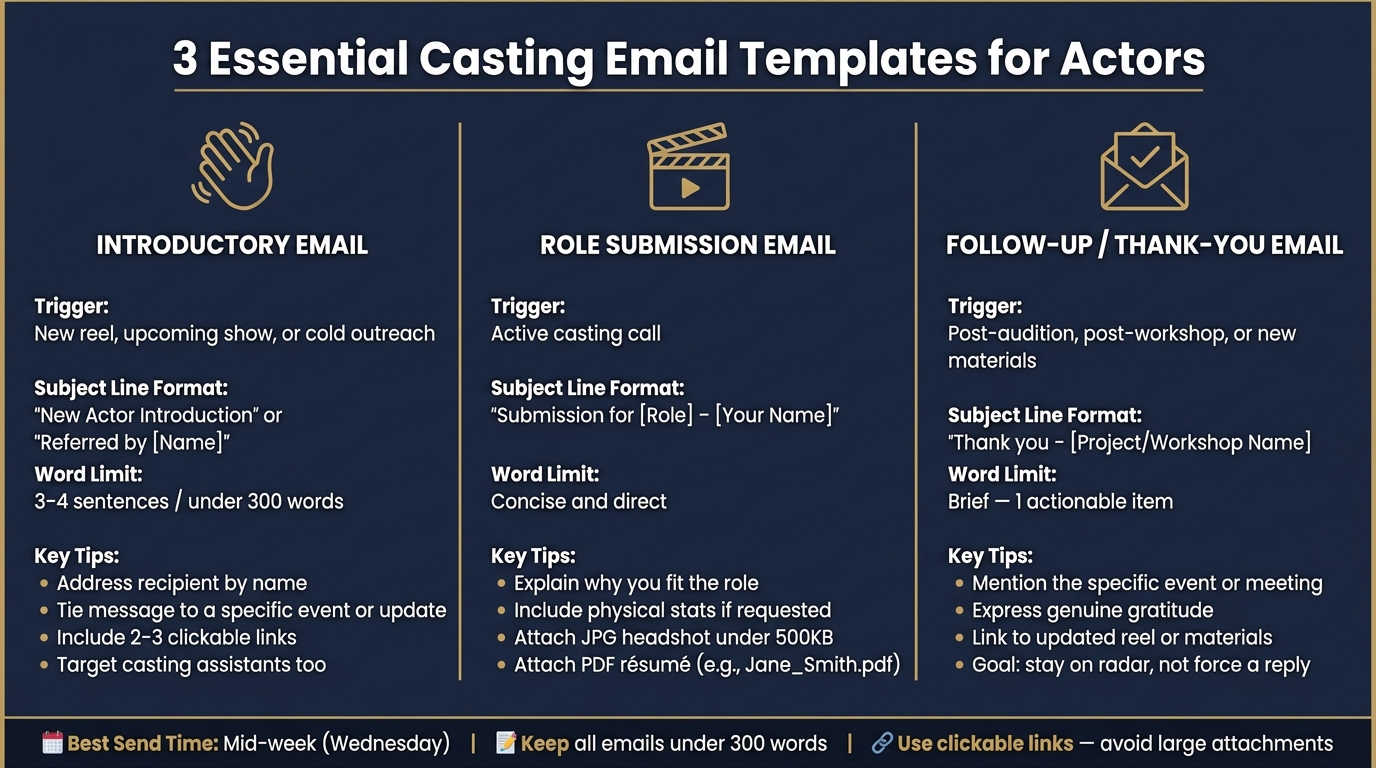
3 Essential Casting Email Templates: Structure, Triggers & Subject Lines
Different emails have distinct purposes, so using tailored templates ensures your outreach remains focused and professional. Below are templates designed to meet specific casting communication needs.
Introductory and Networking Emails
An introductory email is all about making a first impression - without expecting immediate results. The goal here is to create visibility and spark interest. Make your message timely by tying it to a specific event, project, or recent update, and always address the recipient by name. Targeting casting assistants or newer team members can increase your chances of a response since they’re often actively building their own talent networks.
"Your email should give them a reason to engage now, not someday." - Dramanic Blog
"Your entire message will be no more than 3-4 sentences plus a few links. The goal here is to simply plant a seed and make your email very brief and breezy." - Victoria Tamez, Actor/Teaching Artist
Keep it short - just 3-4 sentences - and include a couple of key links to make it easy for them to learn more about you.
Role Submission and Application Emails
When replying to an active casting call, your email should be direct and to the point. Use a subject line like "Submission for the role of [CHARACTER NAME] ([Your Name])". In the body, briefly explain why you’re a great fit for the role. Include any requested details, like physical stats (e.g., height or clothing sizes), and attach a JPG headshot (under 500KB) along with a clearly labeled PDF résumé (e.g., "Jane_Smith.pdf"). After submitting, consider following up to keep the connection alive. This is a key part of streamlining your casting search and staying organized.
Follow-Up and Thank-You Emails
These emails are crucial for maintaining professional relationships. Send them after auditions, workshops, or when you have meaningful updates, like new footage or a recent booking. Keep it brief: mention the specific event or meeting, express genuine gratitude, and include one actionable item - such as a link to updated materials. Use a subject line like "Thank you – [Project/Workshop Name]" to make your email easily identifiable. Remember, the goal isn’t necessarily a reply but to stay on their radar in a low-pressure way.
Using tools like CastmeNow can help automate these email templates, streamlining your audition submissions for greater efficiency.
| Email Type | Trigger | Subject Line Format |
|---|---|---|
| Introductory | New reel, upcoming show, cold outreach | "New Actor Introduction" or referral-based when a mutual contact exists |
| Role Submission | Active casting call | "Submission for [Role] – [Your Name]" |
| Follow-Up / Thank-You | Post-audition, post-workshop, new materials | "Thank you – [Project/Workshop Name]" |
Organizing and Personalizing Your Templates
Building a Template Library
Start by organizing your email templates based on their purpose. At the very least, create categories for introductions, role submissions, follow-ups, and updates (like sharing a new headshot or reel). Keep these templates in a place where you can access them quickly, such as a Google Doc, a Notion page, or even a dedicated folder within your email drafts.
Here’s a helpful tip: use a distinct color to highlight placeholders like [Name], [Project], or [Role]. This makes them stand out, reducing the risk of sending an email with an unfilled placeholder - an easy mistake that can leave a poor impression. Once your templates are organized, focus on making them feel personal without losing efficiency.
Balancing Personalization and Efficiency
Every email should feel like it was crafted specifically for its recipient, even if the base structure remains the same. A simple, effective framework includes four key parts: an introduction, a career update, a clear ask, and links to your work. While the structure stays consistent, the details you include should be tailored to the recipient.
"Casting directors don't have time to read long emails. Stick to 300 words or less for introductions and 250 words or less for updates." - Anne Alexander-Sieder, Actor and Coach
To make your emails even more effective, bold the most important details - like your location, a standout credit, or a unique skill - so they’re easy to spot at a glance. Adding a brief personal touch, such as a reference to a recent project or shared connection, can make your email feel more genuine while still adhering to the streamlined structure.
Tracking and Updating Your Templates
Once your templates are organized and personalized, it’s important to track how they perform. Use a simple spreadsheet to log who you’ve contacted, when you reached out, and which template you used. If certain subject lines or approaches aren’t getting responses, that’s a clear sign it’s time to tweak them.
Review your entire template library every 3–6 months to ensure the tone and content stay up-to-date with your latest achievements. This regular maintenance keeps your emails relevant and reflective of your current work.
"Templates should work for you, not against you. Keep them flexible, keep them fresh, and most importantly - keep them you." - Astoria Redhead, Author, The Actor's Index
Don’t wait for your next scheduled review to make updates. Whenever you land a new role, finish a significant project, or update your materials, revise your templates immediately to reflect these changes. Staying proactive ensures your emails always showcase your best and most recent work.
Using Automation with Casting Email Templates
How CastmeNow Simplifies Role Submissions
Even with a solid library of email templates, manually sending submissions takes time - this is where automation changes the game.
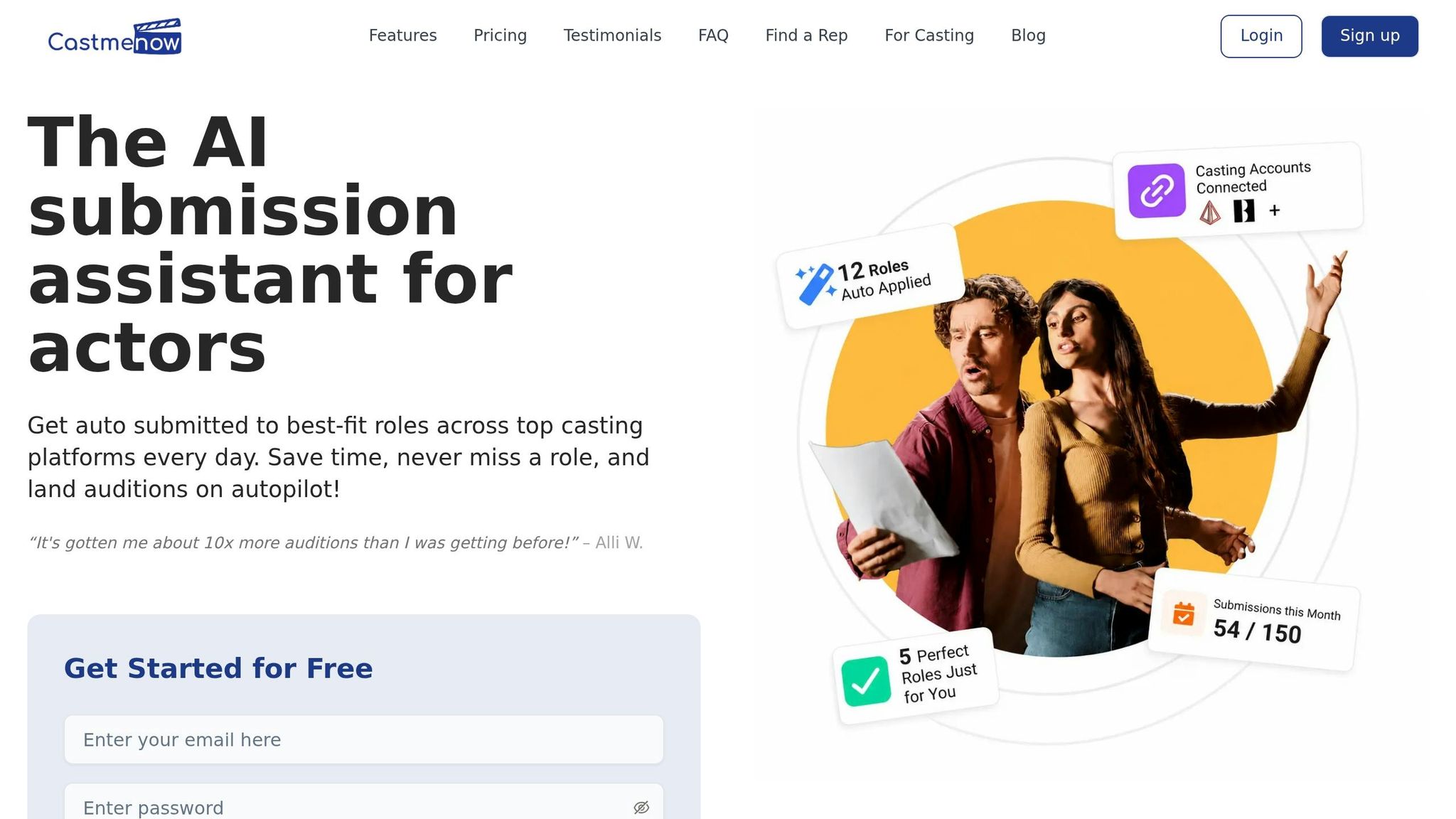
CastmeNow, an AI-powered submission tool, connects directly to your casting profiles on platforms like Casting Networks and Actors Access. It monitors the latest roles, evaluates how well they align with your preferences, and automatically applies on your behalf. This can save hours of work, with some actors submitting to as many as 150 roles in a single week.
This tool doesn’t just handle bulk submissions; it makes them smarter. Using a fit score system, the AI carefully reviews each casting notice based on factors like your location, union status, credits, and role type. With a 95% accuracy rate for matching talent with roles, it ensures your submissions are targeted rather than random.
"With CastmeNow we help actors auto-apply to hundreds of acting jobs every single day. We save them hundreds of hours and get them a lot more auditions without lifting a single finger." - Shreyans, Founder, CastmeNow
CastmeNow also offers three options for submission notes: custom-written, AI-generated, or always included. The AI-generated notes pull directly from your credits and profile, explaining why you’re a great fit for each role. This adds a layer of personalization even to automated submissions.
While CastmeNow takes care of repetitive tasks, personalized email templates still play a critical role in building relationships with casting professionals.
Using Automation Alongside Email Templates
Automation can handle the heavy lifting, but combining it with a personal touch creates the best results. While CastmeNow manages high-volume applications, personalized email templates help you connect directly with casting teams.
A balanced workflow might look like this: let CastmeNow run in the background, auto-applying to relevant roles around the clock. When a self-tape request or direct inquiry comes through, switch gears to personalized communication. This is where having follow-up and thank-you templates ready can make all the difference - quick, thoughtful responses can turn an automated submission into a real audition opportunity.
"This is not mass outreach or cold casting. Every message is driven by casting teams actively searching for talent that fits their project." - CastmeNow
To make the most of automation, keep your profile updated. CastmeNow relies on your headshots, reels, and verified credits to calculate accurate fit scores and craft tailored outreach content. A current profile ensures the AI reflects your best work, making every submission count.
Conclusion: Getting the Most Out of Casting Email Templates
Using the strategies outlined above, you can make your casting outreach both streamlined and personal.
Having a well-organized library of templates not only saves time but also ensures your messages remain polished and consistent. It’s all about balancing efficiency with a touch of individuality.
Some key tips: personalize your greetings, include clickable links to highlight important details, reach out to casting assistants as well as directors, and aim to send emails mid-week to avoid Monday’s inbox clutter.
"Writing to casting directors - intelligently, professionally, and with purpose - isn't desperate or to be shied away from. It's part of the job." - Dramanic Blog
To stay on top of your outreach, pair your templates with tracking tools. This helps you avoid sending duplicate emails and adjust your strategy if certain subject lines aren’t getting responses.
For submissions, platforms like CastmeNow can handle the heavy lifting by auto-applying to roles on Casting Networks and Actors Access. While automation takes care of volume, your templates bring the personal touch that technology alone can’t provide. Together, these tools form a complete outreach strategy, ensuring no casting opportunity slips through the cracks.
"Your uniqueness is your strength. By being yourself, you give casting directors a clear sense of who you are and where you fit." - Anne Alexander-Sieder, Actor and Coach, ACT BOLD
Start with the basics: create three essential templates - an introductory email, a role submission, and a follow-up. Then, refine them over time. Consistency is what drives results.
FAQs
What should I include in a casting email?
Writing a professional casting email requires a balance of brevity, personalization, and clarity. Here's how to craft one that stands out:
- Start with a clear subject line that specifies the casting type or role you're applying for. This helps the recipient immediately understand the purpose of your email.
- Address the recipient by name to make the email feel personal and intentional.
- Introduce yourself briefly, including your name and location, so the recipient knows who you are and where you're based.
- Clearly explain why you're reaching out - whether it's for a specific role, project, or general consideration.
- Include clickable links to your headshot, CV, and showreel. These should be easy to access and professionally presented.
- Highlight two key credits or mention relevant skills and languages that make you a strong fit for the role.
- Wrap up with a professional call to action, such as asking for a meeting, audition, or further consideration.
By keeping your email focused and professional, you'll leave a strong impression and make it easy for casting professionals to review your materials.
Should I attach my headshot and résumé or use links?
Always stick to the submission guidelines given by the casting director. If no specific instructions are provided, it’s usually best to include clickable links to your reel, website, and portfolio. This approach helps prevent your email from getting caught in spam filters or appearing cluttered.
You can also embed a small, low-resolution headshot directly in the email body or your signature for added convenience. If you need to attach files, make sure your résumé is in PDF format, and keep your headshot file size under 500 KB to ensure quick and easy access.
How often should I follow up with casting?
Wait at least four business days after your first outreach before following up. For cold submissions, stick to a structured timeline: send a reminder within 4–7 days, and if needed, a final, polite follow-up after about two weeks. To make your follow-ups worthwhile, share updates - like a new reel or recent credit - that might catch their attention. If you don’t get a response, don’t take it personally. Silence often has more to do with timing than outright rejection. Tools like CastmeNow can help make this process smoother and more efficient.