How Cloud Casting Tools Cut Admin Time

Actors can lose 1+ hour a day on casting admin alone. From what I see in this article, cloud tools cut that time by moving three jobs into one system: role filtering, submission tracking, and file access.
Here’s the short version:
- I can save filters instead of rebuilding searches on each casting site
- I can use AI matching to spot roles and even submit within minutes
- I can keep all submissions in one dashboard instead of a spreadsheet
- I can get deadline and callback reminders without extra manual work
- I can store headshots, resumes, and self-tapes in the cloud so they’re ready on any device
The article’s main point is simple: when I spend less time searching, logging, and hunting for files, I get more time for classes, rehearsal, script prep, and self-tapes.
Quick comparison:
| Task | Manual setup | Cloud tools | AI-supported tools |
|---|---|---|---|
| Finding roles | Often 1+ hour/day | About 15–30 minutes/day | Minutes/day or automatic |
| Missing new roles | High chance | Medium chance | Lower chance |
| Tracking submissions | Spreadsheet or notes | One dashboard | One dashboard with role matching |
| File access | Stuck on one device or folders | Available anywhere | Available anywhere |
If I want a lighter casting workflow, the biggest shifts are small: save filters, track submissions in one place, and keep current files online.
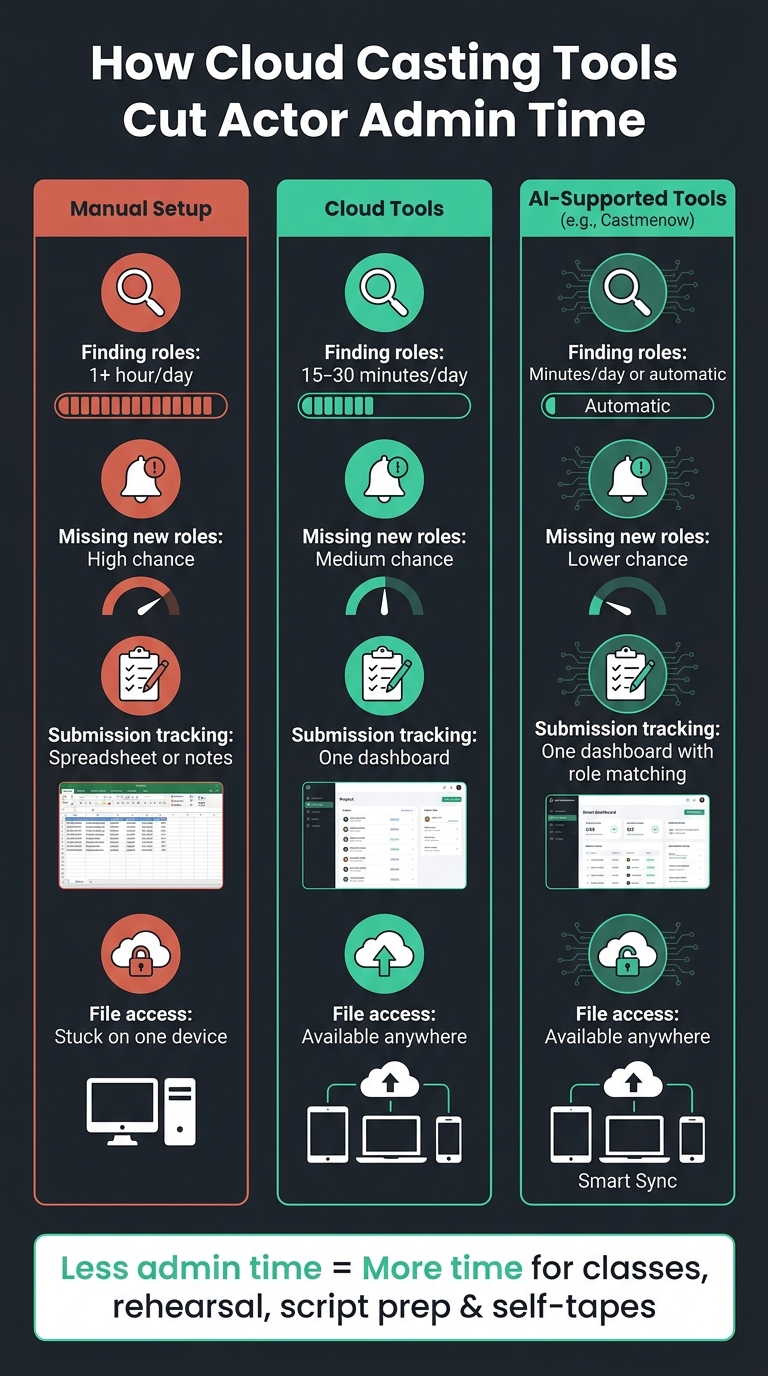
Cloud Casting Tools vs Manual Workflow: Time Savings for Actors
Role filtering cuts search and click time
Without saved filters, each search starts from zero. Cloud tools keep your settings in place, so you don’t have to rebuild the same search every time.
Saved filters narrow down roles faster
Cloud-based casting tools let actors set filters once and use them again in each session. You can sort roles by due date, posted date, or best fit score, and hide roles that don’t line up with your profile. That makes the feed easier to scan and puts the best-fit roles near the top.
AI matching reduces missed roles and repeated submissions
After you’ve filtered for the right roles, the next time sink is checking those same rules every day. If you want to spend less time refreshing listings, AI can watch for new roles for you.
Castmenow (Cast Me Now) connects securely to casting platforms, learns your role preferences, and submits strong matches on its own. Its AI intake assistant records your preferences, and weekly check-ins keep them up to date. That means roles can be reviewed and submitted within minutes of being posted, even if you’re on set or in rehearsal.
Manual role search vs. cloud filtering vs. AI matching: a side-by-side look
| Feature | Manual Role Search | Cloud Role Filtering | AI Role Matching (e.g., Castmenow) |
|---|---|---|---|
| Daily Time Required | High (1+ hours/day) | Medium (15–30 mins/day) | Low (minutes/day or fully automated) |
| Likelihood of Missing Roles | High | Moderate | Low |
Submission logs and reminders cut follow-up mistakes
Once you've filtered down to the right roles, the next drag on your time is keeping up with what happens after each submission. Manual spreadsheets tend to fall apart once submissions start stacking up. Dates get missed, duplicates slip in, and follow-ups sit in limbo.
Centralized submission logs replace scattered notes
Cloud-based submission dashboards fix that by logging each submission automatically. You can see what was sent, when it went out, and which materials were attached. That makes follow-up much easier, because you don't have to hunt through scattered notes to piece things together later.
Castmenow tracks submissions across connected platforms in one dashboard and hides roles you've already applied to, so your feed stays focused on new roles.
Automated reminders keep deadlines and callbacks on track
Automated reminders flag deadlines and callbacks, which helps you stay on schedule with follow-up.
Spreadsheet tracking vs. cloud submission dashboard: a side-by-side look
| Feature | Manual Spreadsheet Log | Cloud Submission Dashboard |
|---|---|---|
| Accuracy | Prone to human error and forgotten entries | Automated, real-time data capture |
| Update Speed | Slow; needs manual entry after each task | Instant; updates as soon as a submission is made |
| Device Access | Often limited to local files or specific apps | Available from any device (mobile, tablet, laptop) |
| Daily Workload | Adds extra daily data entry | Zero extra work; tracking is a byproduct of use |
With submission tracking handled automatically, actors spend less time updating logs and more time on prep. Once submissions are logged and reminders are in place, file access becomes the next workflow speedup.
sbb-itb-daa9c42
Cloud file storage speeds up self-tapes, resumes, and headshot updates
Once submissions and reminders are in order, file access often becomes the next big slowdown. It sneaks up on you. You find the right role, you're set to submit, and then suddenly you're digging through folders for the right headshot or exporting a self-tape all over again. Cloud storage helps remove that drag by keeping your current files in one place.
Keep current materials ready on any device
Use one master folder for your career materials. Keep folder names clear and simple, like "Headshots 2026" and "Self-Tapes - Active", so there's no guesswork about which file is current. If you need to reply from your phone, the same files from your desktop are already there. No manual transfers. No emailing files to yourself.
One current folder also lowers the chance of sending an old resume or a draft tape by mistake.
Faster sharing cuts last-minute rush
When a request lands at the last minute, the slowdown usually isn't the audition itself. It's finding the file, attaching it, and sending it out fast enough. Cloud storage makes that part easier. You pull up the right file and share it right away.
That's a big deal when the clock is ticking and you need the current file NOW.
Local-only files vs. cloud file access: a side-by-side look
| Task | Local-Only Storage | Cloud Storage |
|---|---|---|
| Preparing a self-tape submission | Locate file, check version, then upload | Open pre-organized folder, select current file, share link |
| Sending materials on short notice | Search device, attach file, wait for upload | Copy shareable link, send immediately |
| Updating a headshot or resume | Re-upload manually to every platform separately | Update once in cloud storage |
| Device access | Limited to one machine; requires manual transfer | Accessible from any phone, tablet, or laptop |
With files set up in the cloud and ready in seconds, that last-minute scramble before a submission deadline turns into a few quick clicks.
Conclusion: A lighter daily workflow leaves more time for acting
Acting admin adds up fast. Searching for roles, tracking submissions, meeting deadlines, and hunting down files can quietly eat up a big chunk of your week. And that time comes straight out of the work that helps your career move: classes, rehearsal, script prep, and better self-tape prep.
When those basics are handled well, your day feels lighter. Cloud casting tools help with each of those pain points in a simple, practical way. Saved filters and smart matching cut down the time you spend looking for roles. A single submission dashboard replaces scattered notes and spreadsheets, while due-date sorting keeps urgent roles front and center. And with cloud storage, your current headshots and self-tapes are ready the moment you need them.
The small workflow changes that make the biggest difference
You don't need to rebuild your whole system overnight. This works best as a small shift: replace one manual habit with a smarter setup, and the time savings start to stack up.
- Use saved filters so you only see roles that fit your type and goals.
- Keep one submission dashboard instead of splitting your tracking across notes and spreadsheets.
- Use reusable submission templates so you're not rewriting the same message for every application.
- Store all audition materials in the cloud so you don't end up scrambling for the right file at the last minute.
If you want to automate more of the repetitive work, Castmenow (Cast Me Now) can monitor matches and submit on your behalf while you stay in control.
The goal is simple: spend less time on admin and more time on the craft.
FAQs
How do I start using cloud casting tools without changing everything at once?
Start small. With Castmenow, you can use the 30-day free trial, connect your existing Casting Networks and Actors Access profiles, and get started with the Basic Plan.
That plan lets you automate up to 10 submissions per day while keeping control in your hands. You can review submitted applications in Discover, filter opportunities, and tweak settings or skip roles that don't match your current goals.
What files should I keep in the cloud for faster submissions?
Keep your main work files in the cloud so you can get to them fast when it’s time to submit:
- Headshots
- Up-to-date resume
- Edited demo reels
It also helps to keep a simple spreadsheet with your project history, submission dates, and role details. That makes it easier to stay organized and spot patterns in the kinds of roles you want to go after.
How much daily time can AI matching realistically save?
AI tools like Castmenow can save more than 5 hours a week on admin work in a way that feels very real, not just good on paper. When casting-site checks and role submissions run on autopilot, actors get that time back for the work that actually moves their career forward: classes, audition prep, and networking.
There’s another big plus. These tools keep working 24/7, so you’re not stuck refreshing casting sites or trying to squeeze submissions into a packed day. That steady coverage can help actors submit for far more roles than they could by hand - often 80+ roles a week.