7 Search Filters That Change Role Order

Your filters don’t just cut roles out - they change what shows up first. If you set age, pay, location, union status, representation, role type, and remote-work filters with care, you can streamline your daily casting search to find better-fit roles faster and skip listings you can’t take.
Here’s the short version:
- Age range shifts your feed toward roles that fit your playable age.
- Role type changes the mix of lead, principal, co-star, background, voiceover, and other work.
- Pay removes unpaid or low-rate jobs and pushes higher-rate roles up.
- Shoot location favors local work and cuts out roles that are too far away.
- Representation sorts for self-submit vs. agency-only access.
- Union status keeps SAG-AFTRA, eligible, or non-union roles in the right lane.
- Remote work moves self-tape and virtual-friendly roles higher.
That matters because speed counts. The article notes that Actors Access advises actors to submit the same day a breakdown is posted. It also points out that about two out of three acting jobs go to performers under 40, which means small filter mistakes can shrink what you see.
My main takeaway: filters work best when I set hard limits first and then narrow by money and travel. That keeps the top of the feed closer to roles I can submit to now, not just roles that happen to be new.
Quick Comparison
| Filter | Main job | What it changes most |
|---|---|---|
| Age Range | Matches playable age | Who gets seen at all |
| Role Type | Sorts by kind of role | Feed mix and ranking |
| Pay | Sets a minimum rate | Paid roles move up |
| Shoot Location | Limits by area | Local jobs show first |
| Representation | Controls submission access | Self-submit vs. gated roles |
| Union Status | Matches union lane | Removes off-limits roles |
| Remote Work | Finds remote-friendly jobs | Virtual roles move up |
So if I want a cleaner feed, I shouldn’t think of filters as simple on/off buttons. I should treat them like a ranking system that decides which roles get my attention first.
1. Age Range
Age range changes what shows up first because casting platforms push playable matches ahead of close calls. In most cases, roles are sorted by playable age, not your birth date.
So when you change your age range, your feed shifts with it. Roles where you fit the requested bracket cleanly tend to move up. Edge-case matches usually slide down.
This hits hardest when you're in an in-between stage. A profile set to 18–22 may bring up mostly teen, student, and young-romantic parts. Change that to 20–26, and you may start seeing more young-professional roles and network co-star parts instead. SAG employment data shows that about two out of three acting jobs go to performers under 40, which means actors over 40 are already chasing a smaller share of available work. If your age range is off, the list of roles you see can shrink fast.
There’s risk on both sides. If your range is too tight, you can miss nearby roles you could book. If it’s too broad, the feed gets noisy and pushes stronger-fit roles lower.
The best move is simple: keep the range broad enough to catch adjacent fits without flooding your feed.
An old range can put you in the wrong age band and bury roles that now match your look. Next, role type separates lead, principal, and background work.
sbb-itb-daa9c42
2. Role Type
After age range, role type shapes the kind of work you see first. It separates lead, supporting, co-star/guest star, recurring, background/extra, voiceover, theater, commercial, and hosting/presenter roles into clear buckets.
That matters because these labels sort jobs by both level and format. So lead, supporting, co-star, background, voiceover, theater, commercial, and hosting listings don’t all fight for space in the same feed. Without this filter, your results can turn into a grab bag, with background and smaller day-player roles floating to the top simply because more of them get posted or because they went live more recently.
Backstage recommends using role type to filter out irrelevant jobs.
Early-career actors may go after co-star, background, and student or indie roles. Mid-career actors may put more attention on supporting and recurring work. Voice actors and hosts can use the voiceover or hosting filters to skip listings that have nothing to do with their lane.
At the same time, it helps to stay a little flexible. A supporting role can come with almost lead-level screen time. A featured background role might include a line and upgraded pay. That’s why it makes sense to run one broader search each week and check for strong roles sitting just outside your usual filter.
Think of role type as a strategy filter, not just a simple toggle. Castmenow can use the same role-type preferences to submit only matching roles automatically.
3. Pay
The pay filter cuts out unpaid or low-paid roles and pushes the rest around based on rate and compensation type. Set a minimum rate, and the platform removes anything below that number, then re-sorts what's left. Higher-paying roles move up. Unpaid listings disappear.
After you set pay, the feed starts leaning toward roles that meet your floor. For example, an actor in New York who sets a $200/day minimum for principal roles and blocks unpaid listings can shrink 100+ daily results to about 20–30, with most of those coming from professional commercials, corporate shoots, and higher-end indie projects.
Pay in casting notices can get messy. The same role may list one rate for union talent and another for nonunion talent. In some cases, the union and nonunion versions of that role look far apart on pay. That matters when you filter, because a setting like union scale or above can hide the lower-paying nonunion version of a role you could still book.
The trade-off is simple: more options vs. a firmer pay floor. Tight pay filters keep your feed clean and help you protect your rate. But they can also push down a low-budget pilot from an emerging streamer or an unpaid short tied to a director worth knowing.
A smart move is to run your usual filtered search each day, then lower the minimum for a quick weekly scan of what's sitting just under your line. Castmenow can flag roles that fall a bit below your minimum so you can check them fast. After pay, location is usually the next filter that changes the list in a big way.
4. Shoot Location
Shoot location filters roles by city, state, region, or travel radius. In plain English, it pushes nearby jobs up and drops far-away roles out of the feed. That matters even more when a role is local-hire only.
On Casting Networks, roles released only to talent in Los Angeles never appear for talent outside Los Angeles. So location isn't just a way to sort results. It's a hard gate.
Casting Networks recommends release areas within about a 3-hour drive of the shoot. Once you're looking at roles more than roughly 7 hours away, productions usually need to cover travel and lodging. Location filters also help split local jobs from roles that require travel.
Opening up your location settings can bring in travel-paid studio films, national commercials, and higher-budget union projects. The tradeoff is simple: more access, but also more competition and tighter requirements. After location, representation can narrow the feed even more.
A smart move is to run a second saved search for a nearby hub or other market you can realistically reach. Castmenow can learn your preferred shoot locations and prioritize matching roles.
5. Representation
After location, representation determines which roles you can even submit to.
This filter controls access to listings such as agency-only, manager-only, or self-submit roles.
If you're unrepresented, you need self-submit roles near the top of your feed. Without that filter turned on, agency-only listings can take over the top spots, and the roles you can actually go after get pushed down.
If you do have representation, the same filter does the opposite. It pushes agency-only roles higher in your feed, so the best-fit openings are easier to spot and act on fast.
Castmenow can prioritize roles that match both your submission access and your profile.
6. Union Status
On U.S. casting platforms, this filter sorts roles into SAG-AFTRA, SAG-AFTRA eligible, SAG-AFTRA only, and non-union. Set it the right way, and you’ll see listings that fit your status while the rest drop out of view. That matters in different ways based on whether you’re union, eligible, or non-union.
For SAG-AFTRA members, the union filter removes non-union listings from the feed and cuts down on manual screening.
For non-union actors, it works the other way around. Non-union roles move to the top, while union-only listings are hidden or pushed down. That makes it simpler to stay focused on roles you can actually submit to, like indie films, regional commercials, and web content.
For SAG-AFTRA-eligible actors, the filter helps you spot when union-covered credits start showing up.
Use the filter the wrong way, and you can burn time on roles you can’t take or end up with submissions that don’t follow the rules. Castmenow reads your union status from your profile and matches you to fitting roles automatically.
Next, remote work changes which roles stay in play when location is flexible.
7. Remote Work
When travel gets in the way, remote work can keep certain roles on the table.
This filter moves self-tape and virtual roles closer to the top and pushes down listings that need you on-site. Unlike the location filter, it still shows non-local roles when they can be done remotely. Once you switch it on, the platform re-sorts your results so remote-eligible listings that fit your profile appear higher. So yes, it changes the order of results, not just which roles show up.
That said, eligibility still counts. This filter helps you spot remote-friendly roles faster, but it doesn't cancel out your other preferences or profile details. Castmenow can store your location and remote-work preferences so matching roles rank higher.
Filter Comparison Table
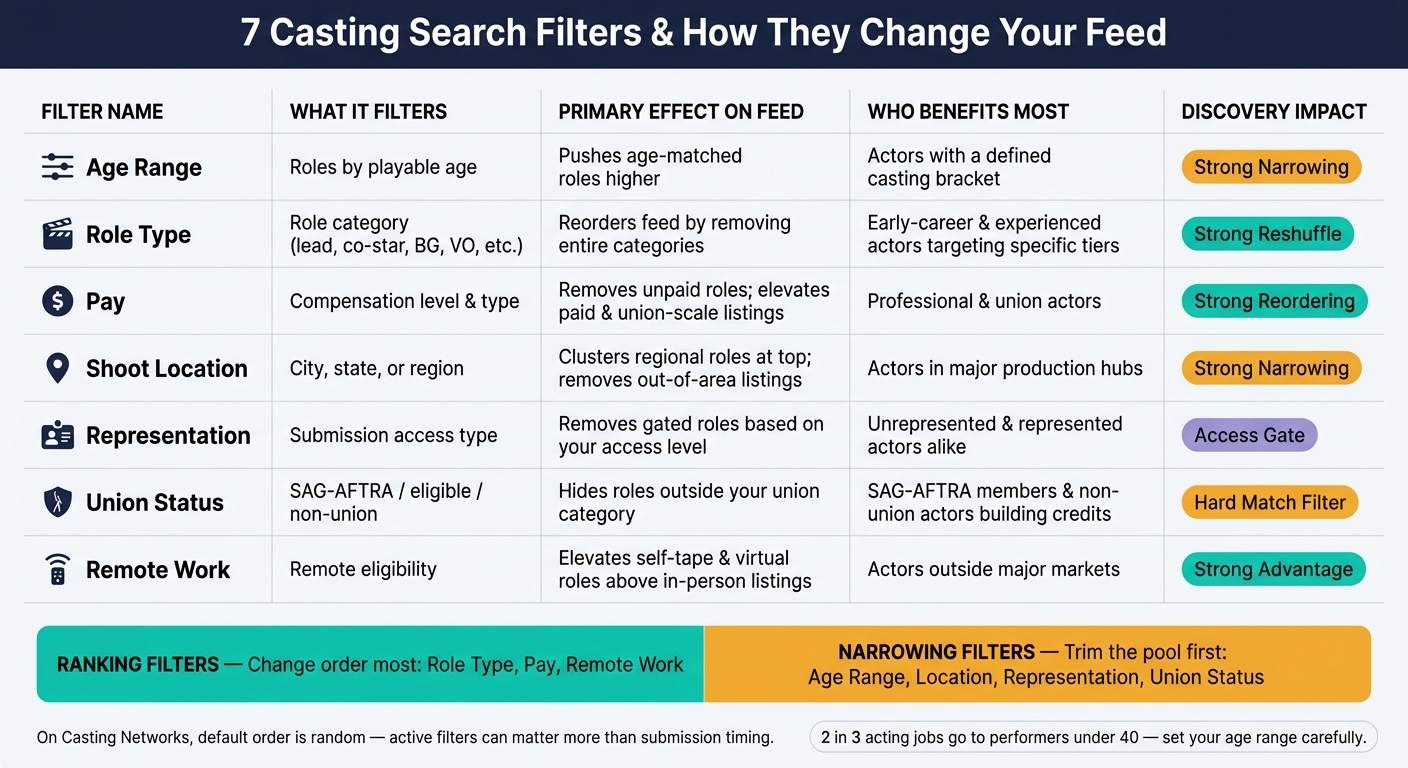
7 Casting Search Filters: How Each One Changes Your Role Feed
After the breakdown above, this table lines up all seven filters in one place. They don't all do the same job. Some narrow what you see. Others shuffle the feed and move certain roles higher.
| Filter | What It Filters | How It Changes Role Order | Who Benefits Most | Typical Discovery Effect |
|---|---|---|---|---|
| Age Range | Roles by requested playing age | Pushes age-matched roles higher; buries out-of-range listings | Actors with a clearly defined casting bracket | Strong narrowing |
| Role Type | Role category | Reorders the feed by removing entire role categories | Early-career actors targeting co-star and supporting roles; experienced actors chasing principal or lead roles | Strong feed reshuffle |
| Pay | Compensation level and type | Removes unpaid projects; pushes paid and union-scale roles to the top | Professional actors treating acting as primary income; union actors needing scale or above | Strong reordering |
| Shoot Location | Shoot city, state, or region | Clusters regional breakdowns at the top; removes out-of-area listings | Actors in major production hubs who can self-report as local hires | Strong location narrowing |
| Representation | Submission access | Reshapes the feed by removing gated roles depending on your submission access | Unrepresented actors finding open calls; represented actors targeting agency-only breakdowns | Access gate |
| Union Status | Union category | Removes roles that don't match your union category | SAG-AFTRA members avoiding non-union work; non-union actors building credits | Hard match filter |
| Remote Work | Remote eligibility | Elevates remote-eligible listings above strictly local in-person roles | Actors outside major markets; performers with limited travel availability | Strong advantage outside major markets |
A simple way to think about it: Role Type, Pay, and Remote Work tend to change ranking the most. They can make your feed look very different, very fast.
Age Range, Shoot Location, Representation, and Union Status do more of the narrowing work. They trim the pool first, then shape order as a side effect.
On Casting Networks, default order is random, so active filters can matter more than submission timing.
Conclusion
Filters shape both what you see and what gets pushed to the top, so start with eligibility first. That helps better-fit roles show up sooner. In practice, filter order is a strategy call, not just a search step.
Put the hard limits first: age range, union status, and representation. Then narrow things down with pay and location. Default views can blur that logic. On Casting Networks, for example, the default Casting Billboard already applies preset filters based on age range, gender appearance, and location - that's a starting point, not a strategy.
Actors who stack filters with intent - like using pay, location, and union status together when time is tight - are using the platform's sorting system on purpose.
The aim is simple: get to roles worth submitting to, faster. For actors who want that work handled for them, Castmenow sits on top of existing casting platforms and takes care of submissions based on your profile.
FAQs
Which filters should I set first?
Start with your core criteria: age range, location, project type, and union status, such as SAG-AFTRA or AEA. These filters narrow the results to roles that fit your personal brand and professional status.
Then tighten things up with more specific filters like pay, required skills, and role significance. That helps you match with parts that make more sense for where you are and what you want next.
How often should I update my filters?
Check your filter settings and casting application results every week. That makes it easier to spot early patterns before they turn into bigger problems. You should also do a deeper review once a month of your conversion rates and your overall approach, including any CastmeNow matching criteria tied to your career goals.
Then, every few months, step back and review your profile, resume, and general plan. If your look, union status, or role preferences change, update your filters or profile right away.
Can filters make me miss good roles?
Yes. If your criteria are too tight, filters can hide good roles that sit just outside your settings for union status, location, or pay.
A profile that’s missing details can also leave you out of searches for specific skills or traits. Review your settings on a regular basis and keep your profile complete so you stay visible for the right roles without boxing yourself in.