How To Track Auditions, Callbacks, Bookings

If I don’t track each audition in one place, I lose time, miss follow-ups, and can’t tell what is leading to work.
The fix is simple: I keep one master log, use the same status labels every time, and update one row per opportunity from submission to final outcome. That lets me track dates, notes, rates in USD, and stage-by-stage results like Submission → Audition, Audition → Callback, and Callback → Booking.
Here’s the whole system in plain English:
- Log every opportunity right away
- Use one status path: Submission, Audition, Callback, Hold/Avail Check, Booked, Declined, Released
- Keep dates in MM/DD/YYYY
- Store short notes only: headshot used, self-tape deadline, casting office, hold window, rate
- Review weekly to clean up open records
- Review monthly to check conversion rates, income, and time-to-result
A log like this does more than store data. It helps me answer simple questions fast:
- Which source sends me the most auditions?
- Do self-tapes lead to more callbacks?
- Which project types book more often?
- How many days pass between submission and result?
- Which bookings paid the most, like $500 vs. $2,500?
For example, if I had 40 submissions, 10 auditions, 3 callbacks, and 1 booking, my stage rates would be:
- Submission → Audition: 25%
- Audition → Callback: 30%
- Callback → Booking: 33.3%
That kind of view makes it easier to see what is working and what needs a change. The goal is not a giant spreadsheet. It is a small, clean system I can update in minutes and use to make better choices.
Below, I’ll walk through the setup, what to log, what to review, and how to turn the log into numbers I can use.
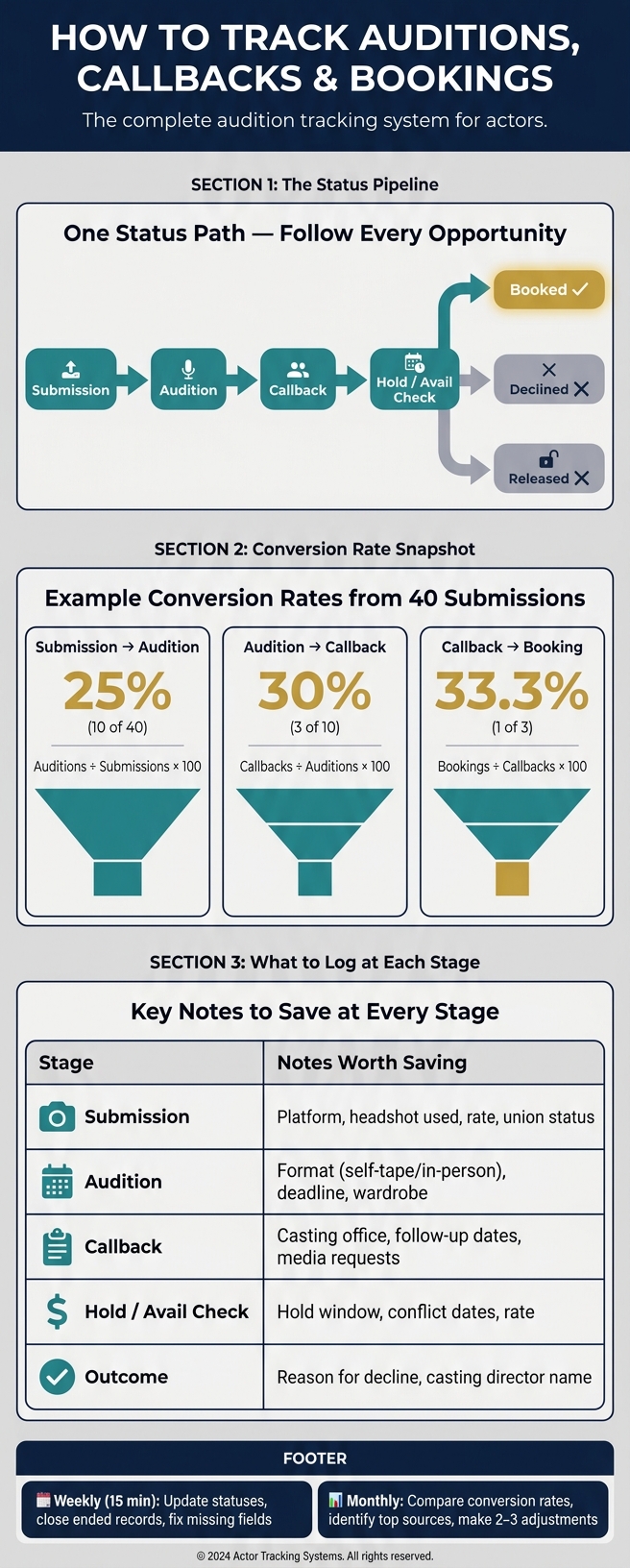
Actor Audition Tracking System: From Submission to Booking
Set Up One Master Audition Log with Consistent Fields
Use one master log for everything. Put every audition opportunity in the same place, from the moment you submit to the moment it closes. Then use the same fields every time and update each row as that opportunity moves through your pipeline.
Core Fields to Include in Every Row
Keep every row in the same format so you can sort, filter, and review your pipeline without having to fix messy entries later. At a minimum, each row should track the opportunity, where it came from, its current status, the main dates, and any notes worth saving.
| Field | What to Log |
|---|---|
| Opportunity / Project | The production or role you submitted for |
| Source / Platform | Where the submission happened |
| Status | A fixed label for the current stage in the pipeline |
| Dates | Submission date, audition date, callback date, availability check date, or booking date as applicable |
| Notes | Any details you may want to revisit later |
Data Entry Rules That Keep Your Log Clean
Use one set of status labels and stick with it. If one row says "booked" and another says "booking confirmed", they won't sort or filter together. That may sound minor, but it can throw off your whole view of the pipeline.
Use MM/DD/YYYY for dates. Also keep the spelling the same for each platform name. A small mismatch here and there can turn a clean log into a headache fast.
How Platform Activity Feeds Into the Log
Check platform activity every day and move any new submissions or status updates into your master log. If you automate your acting audition submissions, you can have new submissions and status changes pulled into the log for you automatically. Once the log is up to date, use it as the single place where each opportunity gets updated as its status changes.
sbb-itb-daa9c42
Track Each Opportunity from Submission to Booking
Once your master log is set up, keep each row up to date as the status changes. Think of the status path in that log as your checklist.
Update the Record at Each Status Change
Each opportunity should stay in a single row. That row just moves from one status to the next.
- Submission date logged - Create the row as soon as you submit.
- Audition scheduled - Add the date, format (self-tape or in-person), self-tape deadline, wardrobe requests, and casting office.
- Callback received - Update the status and note the format and the casting office.
- Availability check or hold - Record the exact hold window they asked about and the date they contacted you.
- Final outcome - Close the record as Booked, Declined, or Released.
That’s the whole system: a status change and a date. Miss one update, and the timeline starts to fall apart. And that timeline is what turns a basic log into something you can actually learn from later.
Save Notes That Are Actually Useful Later
Long notes sound helpful, but most of the time they just slow you down. What matters are the short details you probably won’t remember two weeks from now. At each stage, save the information that can shape later choices.
| Stage | Notes Worth Saving |
|---|---|
| Submission | Platform or source, specific headshot or reel used, union status, location, rate or compensation details |
| Audition | Self-tape or in-person, self-tape deadline, session time, wardrobe requests, project details |
| Callback | Casting office, follow-up dates, any additional tape or media request |
| Availability check or hold | Exact hold window, conflict dates, rate noted |
| Outcome | Reason for a decline, which casting office or casting director responded |
Tracking the exact headshot or reel you used may seem small, but it can tell you a lot over time. You’ll start to see which assets lead to callbacks and which ones just sit there taking up space in your rotation.
Use Filters or Board Views to Spot Active Leads
Filters and board views make it easy to see open submissions, callbacks, and holds without digging through the full log. If Castmenow sends submissions into your log, use those same views to keep active records front and center.
This also makes regular maintenance a lot easier. Before you start working out conversion rates, make sure those active views are clean and current.
Turn Your Log Into Performance Metrics You Can Review
Once your log is up to date, it starts doing more than storing entries. It shows you which chances are moving forward and which ones keep getting stuck. And the best part is you don’t need a new system. You can use the same rows you already track to measure conversion, timing, and booking value.
Measure Conversion Rates by Stage
These metrics help you see where the path from submission to booking starts to break down. Measure each stage against the one right before it.
| Conversion Rate | How to Calculate It | What It Reveals |
|---|---|---|
| Submission → Audition | Auditions ÷ Submissions × 100 | How often your submissions lead to auditions |
| Audition → Callback | Callbacks ÷ Auditions × 100 | How often your auditions lead to the next round |
| Callback → Booking | Bookings ÷ Callbacks × 100 | How often callbacks turn into jobs |
For each rate, divide the later-stage total by the earlier-stage total, then multiply by 100. If one number is lower than the others, that’s usually the first place to look more closely.
Compare Results by Project Type, Audition Format, and Source
Split your log into categories so it’s easier to spot patterns. This is where a plain spreadsheet starts to tell a story.
| Category | Data to Track | What to Look For |
|---|---|---|
| Project Type | TV, film, commercial, voiceover | Which type gets the strongest response |
| Audition Format | Self-tape, Zoom, in-person | Whether remote or live auditions convert better |
| Source / Platform | Agent, manager, self-submission | Which source moves you forward most often |
| Role Type | Leading, supporting, character | Which role types tend to respond best |
A few grouped views can go a long way. You may find that self-tapes lead to more callbacks, or that commercial work books more often than film. Maybe agent submissions get you in the room more often, while self-submissions stall earlier. Those are the kinds of patterns worth paying attention to.
Track Income and Time-to-Result
Add booking value to your log so you can see how much each job pays. Then track time-to-result by looking at the average number of days from submission to audition request, and from callback to booking decision.
You can also compare average booking value by project type to see which jobs pay the most. That gives you a clearer picture of both speed and income, not just volume.
Use these numbers in your weekly and monthly review to spot what to repeat, what to refine, and what to stop tracking.
Review Your Log Weekly and Monthly, Then Adjust Your Approach
Weekly Maintenance in 15 Minutes or Less
Now that your log tracks each stage, set aside a short weekly check-in to keep it clean. This is cleanup, not deep analysis. Block 15 minutes at the same time each week and treat it like routine maintenance.
Use that time to:
- update recent statuses
- add missing outcome dates
- close records that have ended
- fix missing platform, project, or rate fields
When a record is no longer active, move it to a closed status so it drops out of your Active view.
Clean weekly data makes your monthly review far more useful.
Monthly Review to Find Patterns Worth Acting On
Once a month, look back at the last 30 days. Use the same stage counts and conversion rates in your log to compare this month with last month. Check submission, audition, callback, booking, and time-to-result numbers side by side.
Then look a little closer. Which sources - casting platforms, your agent, or self-submissions - led to the best results? Which project types moved furthest through the pipeline? That’s where the log starts to pull its weight.
From there, make 2–3 specific adjustments based on what you see. End each monthly review with one sentence that sums up the clearest takeaway, such as: Most callbacks this month came from self-tapes with strong openings.
Conclusion: Keep the System Simple, Current, and Useful
Weekly cleanup keeps the log current. Monthly review helps you make better submission choices. The goal isn’t to build a giant spreadsheet you dread opening. It’s to keep a small system that helps you decide what to do next.
Track only the fields you use, keep active leads easy to spot, and use weekly cleanup plus monthly review to turn the log into action.
If you’re using an AI-assisted submission tool like Castmenow (Cast Me Now), your log can show which manual vs automated casting submissions led to auditions, callbacks, or bookings. Use what you learn each month to refine the role preferences you’ve set, so the tool’s automated work stays aligned with your goals.
Track only what you use, keep your views filtered to active leads, and let the log guide your next move.
FAQs
What should I do if a project skips a stage?
Log the update as soon as you spot the change. Casting can work a bit differently from one production to the next, so steady recordkeeping helps you keep your history accurate and avoid missing data.
If you use Castmenow, it can help you stay organized by automatically tracking submissions and outcomes, so your records match what’s happening in casting.
How long should I keep old audition records?
Keep your past audition records. They can show patterns, help you spot what’s working, and sharpen your casting strategy.
That said, put the most weight on the last 6 to 12 months. That time frame usually gives you the clearest picture of where you are now.
Older records still matter. They’re useful for checking booking rates and response times over a longer stretch. But a one-year window tends to reflect current industry trends and your recent growth more accurately.
Castmenow can auto-sync submissions and track performance over time.
Which fields matter most if I want to keep it simple?
Keep it simple. Track the core fields: project title, project type, role name, casting director, submission date, audition date, callback date, booking status, and notes.
When you log these the same way every time, it gets much easier to spot patterns. You can see which roles you get called in for most often, which casting directors lead to more auditions or callbacks, and where your bookings tend to come from.